
How to Reduce Alert Fatigue in Security Operations
AI-driven prioritization, automated triage, and contextual enrichment cut false positives and investigation time so SOCs can focus on real threats.
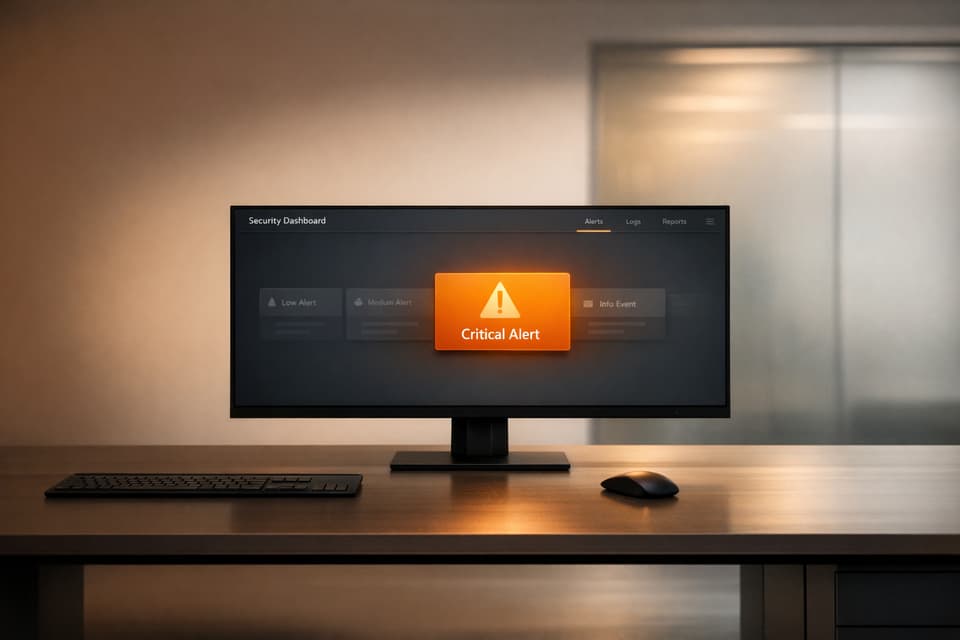
Alert fatigue overwhelms security teams with excessive notifications, making it harder to spot real threats. SOC teams handle thousands of daily alerts, with up to 70% being harmless. This leads to ignored alerts, burnout, and missed attacks. Here's how to tackle it:
- AI-Powered Prioritization: AI ranks alerts by risk, cutting false positives by 75% and reducing investigation time by up to 80%.
- Automated Triage: Automating repetitive tasks saves hours, with some systems closing 61% of alerts automatically.
- Contextual Analysis: Enriching alerts with user, asset, and historical data turns raw signals into actionable insights.
- Fine-Tuned Detection Rules: Adjusting detection rules reduces unnecessary alerts and improves overall accuracy.
Use AI to Prioritize Alerts by Severity
How AI Identifies High-Priority Alerts
AI goes beyond simply reading an alert's initial severity tag. It evaluates multiple factors to calculate risk, such as asset criticality (e.g., distinguishing a production server from a guest laptop), identity risk (involvement of privileged administrators), external exposure (whether the asset is internet-facing), and exploitability. This creates a scoring system that’s both transparent and easy for analysts to interpret, helping them understand why one alert is more urgent than another.
Machine learning also digs into historical data to detect unusual patterns. For instance, it might flag several failed login attempts followed by a successful one from a new location as coordinated activity. In cloud-based DevOps setups, AI uses topology-aware correlation to enrich alert context by integrating data like Kubernetes logs or recent deployment activity. Some systems even include "recent change" indicators, assigning higher risk scores to alerts that occur right after a configuration change.
This process generates a priority score, often on a scale from 0 to 100, that reflects the actual threat level instead of just adding to the noise. Organizations using this method have seen a huge difference - AI-assisted triage can cut investigation times from 15–20 minutes per alert to just 3–4 minutes. This precise scoring system paves the way for more focused and efficient operations.
Benefits of Alert Prioritization for Security Teams
When AI takes over alert prioritization, it allows security teams to direct critical alerts to senior analysts while automatically dismissing low-risk ones after verification. This ensures that skilled professionals spend their time on real threats rather than wading through endless benign notifications. Teams have reported a 63% improvement in detection accuracy.
By cutting out low-value distractions, analysts also experience less burnout and greater job satisfaction. In fact, 79% of analysts reported feeling more satisfied with their roles after AI was introduced to handle triage tasks. Response times improve too, as analysts focus on investigating coherent attack patterns rather than chasing unrelated anomalies.
As Sricharan Sridhar, Cyber Defense Lead at Abnormal AI, puts it: "AI drafts the context, timelines, and suggestions. Humans decide on actions".
This partnership between AI and human expertise allows teams to work at their best, concentrating on genuine threats while leaving the heavy sorting and scoring to AI.
sbb-itb-d663cbd
Automate Alert Triage and Investigation
Automate Initial Alert Triage with AI
AI simplifies the initial steps of alert triage by gathering context automatically from various sources - like IP reputation databases, user identity systems, asset inventories, and cloud logs - and combining it into a complete alert summary. Instead of analysts wasting time switching between tools to collect basic details, the system delivers all the necessary context in just seconds. This process eliminates the repetitive, time-consuming lookups that can eat up hours of an analyst's day.
Modern triage systems also assign a numerical risk score to each alert, factoring in elements like the criticality of the asset, user privileges, and threat intelligence. For example, when the system detects a low-risk pattern, such as a harmless software update causing a benign alert, it can automatically close the case while maintaining a detailed audit trail. In one managed SOC environment, an AI-driven triage system processed around 3.1 million alerts over six months, automating the closure of 61% of those alerts while keeping a false negative rate as low as 1.36%.
Advanced AI systems go a step further with a hypothesis-driven investigation approach, mimicking the logic of experienced analysts. The system begins by assuming a breach and builds a case for its potential impact. Then, it flips the perspective, treating the activity as a false positive and searching for normal patterns that could explain it. This two-step method minimizes bias and allows the AI to reach accurate conclusions more quickly. Over time, the system learns from past actions, automatically suppressing alerts that are typically harmless in your specific environment. This automated triage lays the groundwork for playbooks that make incident investigations even more efficient.
Use Automated Playbooks for Incident Investigation
Automated playbooks streamline investigation workflows with pre-set procedures that activate when specific conditions are met. For instance, if an incident has a high severity score or involves a privileged user, the playbook can automatically take actions like enriching the incident with additional data, notifying team members through tools like Slack or Microsoft Teams, and even isolating a compromised host from the network.
A real-world example: In February 2026, an accounting firm with 3,100 employees used the Automate Security platform to handle threats across its operations. This platform autonomously investigated 88% of all security events by correlating information from email, network, and cloud activity. Over just ten days, the automation saved the security team 1,850 hours of manual investigation, freeing them up to focus on more strategic tasks like improving policies rather than getting bogged down in repetitive triage.
To build effective playbooks, start by identifying your most frequent scenarios - like incident enrichment, syncing with ticketing systems like ServiceNow or Jira, or performing automated responses. Next, configure connectors to integrate with third-party tools and internal APIs. Define automation rules that specify the trigger (e.g., when an incident is logged), the conditions (e.g., severity or detection rules), and the actions (e.g., which playbook to execute). For critical actions, such as disabling a user account, include human-in-the-loop controls that require an administrator's approval before proceeding.
Add Context to Alerts Using Automate Security
Why Contextual Analysis Matters in Alert Management
Alerts often appear as isolated signals - like an unusual login attempt, a sudden spike in network traffic, or the execution of a suspicious file. Without context, these signals can be hard to interpret. Context brings together relevant data from various sources, allowing analysts to make quicker, more informed decisions without the need for manual cross-referencing. This manual process can bog down security teams, delaying responses when time is critical.
By adding context, alerts transform from random signals into actionable insights. For instance, details like user roles, the importance of the affected asset, threat reputation, and past activity patterns help analysts determine whether an alert is a genuine threat or just routine activity. Take this example: a SIEM flags a PowerShell script execution as suspicious. Without context, it might seem alarming. But if additional data reveals it occurred during a scheduled change window by an authorized administrator, the alert is clearly harmless. With 83% of security analysts feeling overwhelmed by the flood of alerts, false positives, and lack of context, embedding this kind of enrichment directly into alerts is essential. Automate Security helps by integrating relevant data into each alert, simplifying the decision-making process and building on earlier AI-driven triage enhancements.
How Automate Security Provides Alert Context
Automate Security takes contextual analysis a step further by integrating insights from multiple data dimensions, making alerts more actionable. This builds on its earlier work in prioritizing alerts and automating triage, enabling security teams to zero in on the most critical threats.
The platform enriches alerts using data from four key dimensions:
- Identity: Information on user roles, departments, and typical behavior patterns.
- Asset: Details about device importance, software inventory, and data sensitivity.
- Threat Intelligence: Insights such as IP reputation, domain credibility, and file hash analysis.
- Historical Context: Records of how similar events were classified in the past.
This multi-layered approach creates detailed incident dossiers that answer the essential questions - who, what, when, where, and why - helping analysts quickly assess and respond to threats. By weaving these elements together, Automate Security ensures that alerts are not just signals but fully informed insights.
Fine-Tune Detection Rules to Reduce False Positives
Optimize Detection Rules for Relevance
Even with AI helping prioritize alerts and providing additional context, poorly adjusted detection rules can still overwhelm teams with unnecessary alerts. Security professionals report that about 60–70% of the alerts they investigate turn out to be benign. This means analysts spend a significant portion of their time chasing false positives instead of focusing on real threats.
The solution lies in fine-tuning detection rules. Here's how to start: gather metadata for all alerts over a 90-day period. Key data points to collect include:
- Alert Name
- Source
- Count
- Total Investigation Time
- Median Investigation Time
- Efficacy (calculated as True Positives ÷ Total Count)
Once you have this data, plot it on a graph with Efficacy on the Y-axis and Total Investigation Time on the X-axis. Focus on alerts in the lower-right quadrant - these are the ones with low efficacy but high investigation time. These should be your top priority for adjustment.
Before disabling or modifying any rule, ask yourself these Three Second-Order Questions:
- Has there ever been a true positive?
- Could a simple logic change reduce 90% of the alert volume?
- Is this rule uniquely capable of detecting a specific threat?
If the answer to all three is "no", it might be time to retire the rule. For rules that still hold value but produce too much noise, consider using watchlists. For example, you can exclude safe zones like corporate IP ranges or known administrative accounts from detection queries. By refining these rules, you create a foundation for AI to further reduce false positives.
Use AI to Reduce False Positives
AI can take rule optimization to the next level by making it a continuous process. Machine learning models trained on historical triage decisions - how analysts classified previous alerts as true or false positives - can predict the likelihood of new alerts being malicious. Companies using AI for this purpose have reported a 72% drop in false positives on average.
AI tools like Insight Training monitor rule performance over time and suggest adjustments. For instance, rules that consistently detect true positives can have their severity increased, while noisy rules can be downgraded. Time series analysis can also help identify temporary spikes in noise caused by changes in the environment or software updates. This allows teams to make temporary tweaks instead of permanent rule changes.
Platforms like Automate Security use these AI-driven methods to keep detection logic aligned with real-world conditions. Transparent risk scoring - rating alerts on a 0–100 scale based on factors like base severity, asset importance, identity risk, and exploitability - helps streamline workflows. High-confidence alerts (scores 80–100) can be sent directly to senior analysts, while low-risk ones (scores below 50) can be auto-closed after basic checks. This approach ensures that your detection rules stay effective and relevant as your environment evolves.
Stop Alert Fatigue: How AI Helps SOC Teams Win
Choose the Right Automate Security Plan for Your Team
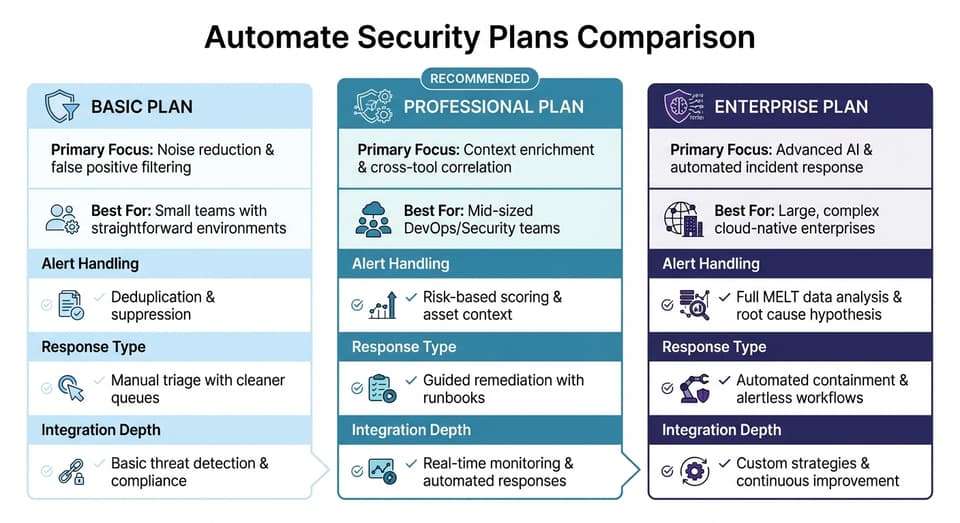
Automate Security Plans Comparison: Basic vs Professional vs Enterprise Features
How to Select the Right Automate Security Plan
Before diving into features, take a moment to pinpoint your team's alert management struggles. Start by evaluating the volume of alerts you handle daily and identifying which tools generate the most false positives. Look for repetitive manual processes in your triage workflow. This analysis gives you a clear picture of your needs and helps you select the right level of automation to reduce noise and free up your team to focus on actual threats.
Workload plays a big role too. Teams swamped with thousands of alerts every day will benefit from advanced filtering. Research shows that many teams can’t investigate up to 40% of their alerts due to sheer volume. If your organization has a complex setup - like using dozens of security tools across a large enterprise - you’ll need a plan with deep integrations for SIEM, EDR, cloud, and identity tools.
The level of automation is another critical factor. Basic plans are ideal for small teams that want to focus on noise reduction and manual control. Professional plans cater to mid-sized DevOps teams by adding features like context enrichment and cross-tool correlation. For enterprises, Enterprise plans take it a step further with advanced AI-driven root cause analysis and automated remediation.
As Sricharan Sridhar, Cyber Defense Lead at Abnormal, explains: "We are not replacing the analyst. We are replacing the toil and elevating the expertise".
When rolling out a new plan, start cautiously. Use "watch mode" to run workflows alongside your manual processes. This lets you evaluate the AI's decision-making and determine whether a basic, professional, or enterprise-level solution is the right fit for your team.
Automate Security Plans Comparison
The table below offers a side-by-side comparison of Automate Security plans, helping you find the best match for your needs.
| Feature | Basic | Professional | Enterprise |
|---|---|---|---|
| Primary Focus | Noise reduction & false positive filtering | Context enrichment & cross-tool correlation | Advanced AI & automated incident response |
| Best For | Small teams with straightforward environments | Mid-sized DevOps/Security teams | Large, complex cloud-native enterprises |
| Alert Handling | Deduplication & suppression | Risk-based scoring & asset context | Full MELT data analysis & root cause hypothesis |
| Response Type | Manual triage with cleaner queues | Guided remediation with runbooks | Automated containment & alertless workflows |
| Integration Depth | Basic threat detection & compliance | Real-time monitoring & automated responses | Custom strategies & continuous improvement |
How Automate Security Helps DevOps Teams
Automate Security plans are designed to meet the specific needs of DevOps teams operating in cloud-based environments. These teams often deal with unique challenges, such as managing Kubernetes clusters and containerized workloads, which require tools capable of processing MELT data (metrics, events, logs, traces). By focusing on context rather than sheer volume, Automate Security ensures that alerts are enriched with critical data - like CMDB and identity insights - before they even reach an analyst.
A standout feature is the risk scoring system, which rates alerts on a 0–100 scale. This score accounts for factors like asset importance, user sensitivity, and exploitability, rather than relying on static severity levels. This approach helps cut down on alert fatigue and ensures your team focuses on what truly matters.
Hamza Razzaq, Cybersecurity Professional, sums it up well: "The future SOC is not faster because alerts move quicker. It is faster because analysts receive fewer, richer, and more accurate signals".
Conclusion
Strategies for Tackling Alert Fatigue
Alert fatigue is a widespread challenge, but structured approaches can make a real difference. Using AI-driven prioritization, your team can focus on the most critical threats first. This involves transparent risk scoring that takes into account factors like asset importance and exploitability. Automated triage and enrichment further simplify the process by delivering complete, actionable evidence rather than scattered signals.
Contextual analysis helps turn raw alerts into meaningful insights by correlating related events into cohesive attack narratives. This approach can reduce thousands of individual alerts into just a few significant incidents. At the same time, improving detection hygiene and fine-tuning your rules tackle the problem at its source. For instance, organizations that apply intelligent filtering and establish behavioral baselines often see a 50% drop in false positives within just a few months.
AI-powered attack discovery is also making a noticeable impact. Many organizations have reported significant reductions in alert volume and investigation time. Security leaders predict that AI will manage around 60% of Security Operations Center (SOC) workloads within the next three years. By moving away from reactive responses and focusing on proactive threat hunting, your team can dedicate its energy to high-priority security tasks.
Actionable Steps with Automate Security
To implement these strategies, start by assessing your current situation. Track metrics like alert dwell time, false positive rates, and investigation throughput for a week. This will help identify where automation can make the biggest difference. A good starting point is addressing your top 10 noisiest detections - quick wins that can provide immediate relief.
Automate Security offers tailored solutions to fit your needs, from small teams to large enterprises. Their platform is designed for cloud-based DevOps environments, offering features like noise reduction, advanced AI-driven root cause analysis, and automated remediation. It processes MELT data (metrics, events, logs, traces) and enriches alerts with insights from CMDB and identity systems before they even reach your analysts. Whether you're managing hundreds or thousands of alerts daily, the right automation tools can help your team shift from constantly putting out fires to proactively hunting threats - allowing them to focus on what matters most.
FAQs
How do I measure alert fatigue in my SOC?
To gauge alert fatigue in your Security Operations Center (SOC), start by evaluating critical metrics such as daily alert volume, the percentage of alerts investigated versus ignored, and false positive rates. When alert volumes are high and investigation rates are low, it’s often a sign that your team is overwhelmed.
You should also keep an eye on response times and missed threats, as these can reveal whether analysts are struggling to keep up. Finally, gathering direct feedback from your analysts alongside these metrics can help paint a clearer picture of how alert fatigue is affecting your SOC.
What should we automate first to quickly reduce alert volume?
Start by targeting low-value, low-risk tasks for automation. This approach helps cut down on unnecessary alerts and false positives - two major culprits behind alert fatigue. A good starting point is automating alert triage and investigation workflows, including tools that handle false positives more efficiently. By focusing on these areas, analysts can shift their attention to more critical threats, which leads to a noticeable drop in alert volume right away.
How can AI reduce noise without missing real attacks?
AI helps cut through the noise of security alerts by using advanced techniques to filter out false positives and highlight the most critical threats. It achieves this through triage and correlation, ensuring that only relevant alerts demand attention. Automated investigations and constant fine-tuning allow detection rules to stay aligned with evolving threats, keeping security measures up to date.
By linking related alerts and zeroing in on high-priority incidents, AI simplifies security monitoring. This approach enables teams to focus their efforts on addressing real risks effectively, reducing the chance of missing genuine attacks amidst the flood of alerts.