
Cloud Security Questions: 15 Answers for Engineers
Practical cloud security guidance for engineers: IAM, encryption, shared responsibility, CI/CD and serverless hardening, multi-cloud monitoring.

Cloud security is all about protecting your data, identities, and systems in the cloud. Here’s what you need to know:
- Threats are evolving fast: Data theft incidents jumped to 82% in 2023, and data exfiltration happens in just 2 days on average, down from 9 days in 2021.
- Misconfigurations are a big problem: 63% of public cloud storage buckets expose sensitive data. Software vulnerabilities now outpace phishing as the top attack entry point.
- AI is changing the game: AI tools help automate threat detection, triage, and remediation, saving time and reducing false positives.
Key Takeaways:
- Core Security Areas: Focus on Identity and Access Management (IAM), encryption, and edge security.
- Shared Responsibility: Know what’s your job (data, configurations) vs. the cloud provider’s (infrastructure).
- Preventing Threats: Use MFA, monitor configurations, secure APIs, and prepare for insider risks and DDoS attacks.
- Building Security: Integrate security into CI/CD pipelines, use Infrastructure as Code (IaC), and secure serverless environments.
- Advanced Tools: Automate multi-cloud security, centralize identity management, and use AI for continuous monitoring.
Cloud security isn’t just about defense - it’s about staying ahead of threats with smart tools and practices. With attackers moving faster than ever, adopting automation and proactive security measures is critical.
Fastest Way To Become a Cloud Security Engineer in 2026
sbb-itb-d663cbd
Cloud Security Fundamentals
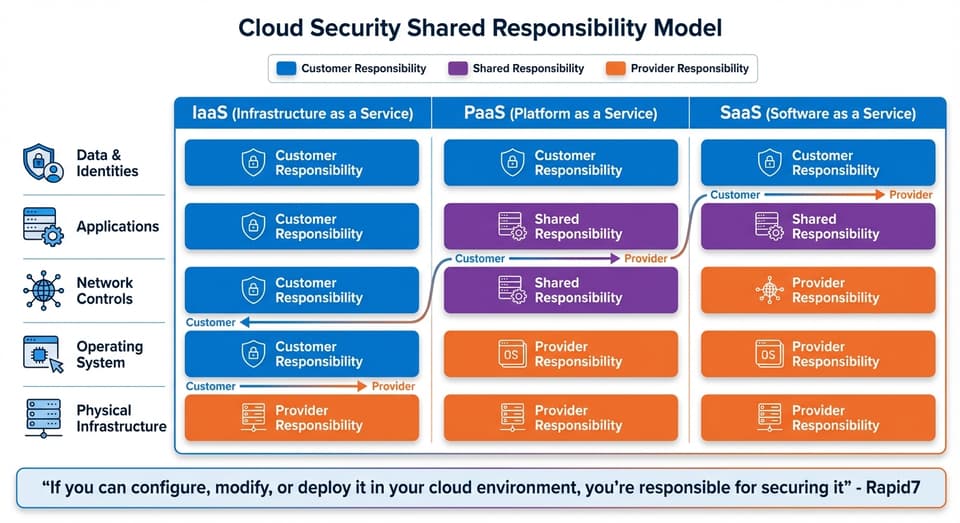
Cloud Security Shared Responsibility Model: IaaS vs PaaS vs SaaS
3 Core Components of Cloud Security
Cloud security relies on three essential elements: Identity and Access Management (IAM), data encryption, and edge security. These components work together to create a multi-layered defense system, reducing risks if one layer fails.
IAM is the backbone of cloud security, controlling both authentication (proving identity) and authorization (defining permissions). In modern cloud setups, managing identities isn’t limited to people - it also includes machine identities like Lambda functions, EC2 instances, and tools that make API requests. The guiding rule is least privilege: grant users and systems only the permissions they need to perform their tasks. Temporary credentials, such as AWS STS, are safer than static keys. Avoid using the root user for daily operations; instead, enable Multi-Factor Authentication (MFA) and create specific IAM users with admin privileges.
Data encryption safeguards information both at rest and in transit. This is especially critical given the variety of databases cloud providers like AWS offer - each with unique security settings. Encryption ensures that even if attackers access the data, they can’t read it without the decryption keys.
Edge security acts as the first line of defense, filtering and inspecting traffic to block unauthorized access and Distributed Denial-of-Service (DDoS) attacks. Use stateful Security Groups for instance-level control and stateless Network ACLs for subnet-level protection. As Roger Zou of Snap Inc. explains:
"We love it when we are able to simply provide extra security without any inconvenience".
To further tighten security, disable unused regions and place databases in private subnets. This reduces exposure and simplifies monitoring. Together, these components establish a solid foundation for understanding the balance of security responsibilities between cloud providers and users.
The Shared Responsibility Model
The Shared Responsibility Model clarifies which security tasks fall to cloud providers and which belong to customers. Providers secure the cloud infrastructure - hardware, physical facilities, and virtualization layers. Customers, on the other hand, are responsible for securing what’s inside the cloud - data, configurations, identities, and application code. Misinterpreting this division can lead to security gaps, compliance issues, and failed audits.
Your responsibilities vary depending on the service model. In IaaS (Infrastructure as a Service), you manage the guest operating system, network setup, and applications. With PaaS (Platform as a Service), the provider handles the OS and runtime, but you’re still responsible for your application code, data, and access policies. For SaaS (Software as a Service), providers take care of almost everything, though you must still manage identity governance and ensure proper data classification. Rapid7 sums it up well:
"If you can configure, modify, or deploy it in your cloud environment, you're responsible for securing it".
| Responsibility Area | IaaS | PaaS | SaaS |
|---|---|---|---|
| Data & Identities | Customer | Customer | Customer |
| Applications | Customer | Shared | Shared |
| Network Controls | Customer | Shared | Provider |
| Operating System | Customer | Provider | Provider |
| Physical Infrastructure | Provider | Provider | Provider |
To strengthen your cloud security, automate tasks with tools like Terraform or CloudFormation. These help maintain consistent configurations and reduce manual errors. Continuous compliance monitoring can detect configuration changes in real-time and streamline audit evidence collection. Instead of assigning policies to individual users, use IAM groups for scalable and consistent access management. And if you’re working with AI, you’ll need to secure prompts, guard against injection attacks, and protect training data used for fine-tuning models.
Preventing and Responding to Cloud Threats
Common Cloud Threats and How to Stop Them
Understanding cloud vulnerabilities is crucial to protecting your managed environment. Cloud threats include account hijacking, misconfigurations, API weaknesses, insider risks, DDoS attacks, and zero-day exploits. Let’s break down how to address these issues:
- Account hijacking often results from weak passwords or the absence of Multi-Factor Authentication (MFA). Enforcing MFA and strong password policies can significantly reduce this risk.
- Misconfigured cloud services, like public storage buckets with incorrect permissions, are common entry points for attackers. Automated configuration monitoring can identify and fix these errors before they lead to breaches.
- API vulnerabilities can arise from weak authentication and poor input validation. Use OAuth or API keys for authentication and sanitize inputs to block attacks like SQL injection.
- Insider threats, whether from employees or contractors, require a least-privilege access model and activity monitoring to detect suspicious behavior.
- DDoS attacks overwhelm systems with traffic. Scalable infrastructure, load balancers, and Content Delivery Networks (CDNs) are effective defenses.
- Zero-day exploits target unknown vulnerabilities. Intrusion detection/prevention systems (IDPS) and threat intelligence feeds help provide early warnings.
In April 2024, over 35 million people were affected by data breaches. For AI workloads, risks like data poisoning and model inversion attacks are growing concerns. Defend against these by validating data and monitoring machine learning pipelines for unusual activity.
Network segmentation is another key practice. Using Virtual Private Clouds (VPCs) and subnets isolates sensitive databases from public-facing servers, limiting the potential for attackers to move laterally if they breach one layer. With 31% of organizations citing vulnerabilities in hybrid work environments, this strategy is more critical than ever. Additionally, securing data transfers strengthens your overall cloud security.
Securing Data Transfers to the Cloud
Protecting data in transit is just as important as preventing threats. Start by using TLS 1.3 as your baseline, redirecting HTTP traffic to HTTPS, and phasing out outdated protocols. For example, AWS officially deprecated TLS 1.0 and 1.1 in February 2024, requiring at least TLS 1.2 for API calls. Configure tools like Application Load Balancers (ALB) or CloudFront to automatically redirect unencrypted requests to HTTPS. Regularly audit and disable outdated components like SSL v3.0, RC4 ciphers, and 1024-bit RSA keys.
For service-to-service communication, Mutual TLS (mTLS) ensures two-way authentication by requiring both client and server to present X.509 certificates. Google Cloud’s Application Layer Transport Security (ALTS) uses AES-128-GCM encryption by default, with its BoringCrypto core validated to FIPS 140-3 Level 1. As Google Cloud explains:
"Encryption in transit defends your data against potential attackers and removes the need for Google, Google Cloud customers, or end users to trust the lower layers of the network".
Private connectivity is another layer of protection. Services like AWS PrivateLink or Google Cloud Private Service Connect keep traffic within the provider’s network, bypassing the public internet. This approach is especially useful for large-scale data migrations, as it ensures consistent throughput without the need for encryption overhead.
To avoid certificate-related outages, automate certificate management with AWS Certificate Manager (ACM), which handles provisioning, deployment, and renewal of SSL/TLS certificates. Strengthen security further by enforcing HTTPS for S3 bucket policies and using IAM conditions to block insecure requests. When making API calls to AWS, ensure they are signed with Signature Version 4 (SigV4) for authentication and integrity. Tools like VPC Flow Logs and Amazon GuardDuty can help detect unauthorized data movement attempts via protocols like DNS.
Fixing Recurring Vulnerabilities
Recurring vulnerabilities require a proactive approach. Automated vulnerability scanning and immutable infrastructure are two key tactics:
- Vulnerability management involves identifying, prioritizing, and reporting issues. Patch management, a subset of this, focuses on updating software to fix vulnerabilities. Tools like Amazon Inspector can continuously scan compute instances, container images, and serverless functions for security gaps.
- Immutable infrastructure is a best practice. Instead of patching running systems, update the source image (e.g., AMI or container) and redeploy. AWS Well-Architected Framework advises deploying workloads in "known good states" whenever possible. Tools like EC2 Image Builder can automate the creation of pre-patched, secure machine images.
Set patch baselines to auto-approve updates within a specific timeframe after their release. Cloud providers typically announce major lifecycle events at least six months in advance, giving you time to prepare. For complex systems, use lifecycle hooks to safely shut down services before updates and validate them afterward. Prioritize fixes based on risk scores and network exposure data to focus on the most critical resources.
Integrating vulnerability scanning into CI/CD pipelines is another effective measure. This catches issues before code reaches production. For containers, use minimal or "distroless" images to reduce the attack surface and enforce immutable tags to prevent unauthorized changes. Application teams should take responsibility for securing their stacks, including the underlying infrastructure they manage. Regular "Game Days" and tabletop exercises can test your ability to respond quickly to emergency vulnerabilities.
Building Security into Cloud Workflows
To keep up with the fast pace of cloud operations, security must be built directly into development pipelines, architectural designs, and serverless platforms from the very beginning. By integrating security measures early, vulnerabilities can be addressed before they reach production, ensuring that safety and speed go hand in hand.
Adding Security to CI/CD Pipelines
Security measures need to operate within the tools developers are already familiar with - like GitHub, GitLab, Jenkins, or Azure DevOps. As Qualys points out:
"If security lives outside the workflow, it will be bypassed, ignored, or seen as a slowdown".
The idea is simple: catch issues early when they’re easier (and cheaper) to fix, rather than scrambling to patch them in production.
A good starting point is dependency scanning at commit time. With over 40,000 new CVEs reported last year, third-party libraries can be a constant source of vulnerabilities. Automated tools can flag these risks before they enter the build process. Similarly, policy engines like Open Policy Agent (OPA) or AWS CloudFormation Guard can validate Infrastructure as Code (IaC) templates, identifying misconfigurations in Terraform or CloudFormation files before resources are provisioned.
Branch protection is another essential measure. By requiring code reviews and automated testing before merging pull requests, you reduce the risk of introducing errors into protected branches. Sensitive information like API keys, passwords, or tokens should never be committed to source control - use managed secret stores for these instead. To prevent tampering, sign and verify artifacts with tools like Binary Authorization or AWS Signer.
Rather than trying to fix every vulnerability, focus on risk-based prioritization. AI-driven tools can help identify which issues pose the greatest business risk, allowing teams to concentrate on what matters most. As Qualys explains:
"The goal is not to slow delivery. The goal is to ensure each release is trustworthy, compliant, and aligned with the organization's risk posture by design".
Providing developers with a catalog of pre-approved IaC templates and configurations can help maintain speed without sacrificing security. Additionally, establish "break-glass" procedures for emergencies, granting audited, temporary access to critical systems during outages. Finally, ensure service accounts follow the principle of least privilege to minimize potential damage from compromised credentials.
Once CI/CD pipelines are secure, the next step is designing cloud systems that are resilient by default.
Designing Secure Cloud Systems
A secure cloud system starts with strong identity management. Enforce least privilege and separation of duties, centralize identity management, and avoid using long-term static credentials. Layered defenses across the network, compute, and application layers provide additional safeguards.
To scale securely and efficiently, define security controls as code and manage them through version-controlled templates. As the AWS Well-Architected Framework highlights:
"Automated software-based security mechanisms improve your ability to securely scale more rapidly and cost-effectively".
This approach minimizes human error and ensures security keeps pace with rapid infrastructure changes.
Real-time monitoring, alerting, and auditing are critical for maintaining traceability. Automated systems should analyze logs and metrics instantly, taking action when necessary. Protect sensitive data by using encryption, tokenization, and strict access controls, both in transit and at rest. While Amazon S3 offers impressive durability - 99.999999999% over a year - data encryption and access policies remain your responsibility.
Shift-left security focuses on identifying vulnerabilities during the design and development phases instead of after deployment. Google Cloud's Well-Architected Framework emphasizes:
"Shift-left security means adopting security practices early in the software development lifecycle".
To support this, integrate tools like Amazon Inspector or Artifact Analysis into CI/CD pipelines to detect vulnerabilities before deployment. Use hardened images based on CIS Benchmarks or STIG standards, and automate their creation with tools like EC2 Image Builder. Transition compute instances to Instance Metadata Service Version 2 (IMDSv2) to block unauthorized requests for instance metadata. Limit deployment pipeline permissions, restricting access to only a small set of resources to reduce potential damage from a compromised pipeline.
Serverless platforms, however, require their own set of security measures.
Securing Serverless Environments
Serverless functions demand a different approach to security. Implement a "role-per-function" model to enforce least privilege, avoiding shared high-privilege roles. The AWS Compute Blog explains:
"Creating smaller, single purpose functions enables you to keep your permissions aligned to least privileged access. This reduces the risk of compromise since the function does not require access to more than it needs".
Place serverless functions in private subnets with controlled egress, and use VPC endpoints to ensure communication stays within the provider’s network. Validate and sanitize all event payloads from sources like S3, API Gateway, or Pub/Sub to prevent malicious data from entering your system. Sensitive information, such as API keys or database credentials, should be retrieved at runtime from secure vaults like AWS Secrets Manager or Google Cloud Secret Manager.
A layered defense strategy remains essential. Combine edge defenses (like WAF and DDoS mitigation) with identity verification (MFA and adaptive authentication), network isolation (VPC), and data encryption (both at rest and in transit). In 2024, AWS mitigated thousands of DDoS attacks, including one exceeding 2.3 terabits per second, highlighting the importance of robust edge defenses.
Automate vulnerability scanning for serverless code and dependencies with tools like Amazon Inspector or Snyk. Code signing with AWS Signer ensures only authorized code runs in the serverless environment. IAM Access Analyzer can review policies, flagging overly permissive statements and generating actionable warnings.
Finally, take precautions with logging. Mask sensitive data to prevent accidental exposure in services like CloudWatch or Google Cloud Logging. Avoid storing sensitive information in global or static variables, as these may persist across function executions. Remember, while the cloud provider secures the infrastructure (security of the cloud), you’re responsible for securing your code, IAM policies, and data (security in the cloud).
Advanced Cloud Security Techniques
When it comes to securing complex, multi-cloud environments, foundational practices are just the beginning. Advanced techniques take things further by focusing on unifying security measures, automating responses, and staying ahead of emerging threats with real-time monitoring. The ultimate goal? Consistent protection, no matter how sprawling or diverse your cloud setup may be.
Managing Security Across Multiple Clouds
Juggling security across platforms like AWS, Azure, and GCP can feel like managing three entirely different ecosystems. Each provider has its own way of handling identity and access management (IAM). For instance:
- AWS uses JSON-based policies tied to users and roles.
- Azure employs role-based access control (RBAC) with just-in-time access via Privileged Identity Management.
- GCP connects roles to members at the resource or project level.
This lack of standardization can lead to misconfigurations - and that’s where Infrastructure as Code (IaC) comes in. Tools like Terraform or Pulumi allow you to define IAM roles and policies in code, ensuring consistent deployment across platforms. Danny Perry, Co-Founder of Clutch Events, sums it up well:
"Automation makes IAM predictable - and that's what security needs".
To simplify management even further, you can create cloud-specific Terraform modules that handle unique permissions models while providing a unified interface for developers. Pair this with a centralized Identity Provider (IdP) using SAML or OIDC to streamline role mapping across platforms. This way, you avoid the headache of maintaining separate user directories for each provider.
For ongoing compliance, automated tools like Cloud Custodian, AWS Config, or Azure Policy can flag policy drift or overly broad access without manual effort. Treat your security policies like software - store them in GitHub and automate deployment with CI/CD tools like ArgoCD or Flux. If you’re managing multiple AWS accounts, consider setting up a centralized security tooling account to serve as a "single pane of glass" for extended detection and response (XDR).
AWS has even introduced features like automated IAM Identity Center replication across 38 regions, ensuring resilience during outages. These steps not only unify your security posture but also prepare you for swift, precise incident response.
Handling Cloud Security Incidents
When a security incident strikes, every second counts. In 2024, 29% of incident investigations involved cloud or SaaS environments, with one in five cases showing direct impacts on cloud assets. The key to minimizing damage? Precision containment.
For example, you can isolate compromised resources by attaching an empty security group to an EC2 instance or revoking specific IAM sessions. However, as the Sygnia Team warns:
"Containment in the cloud has to be surgical. Kill the wrong process or shut down the wrong workload, and you cause more disruption than the attacker".
Automated runbooks, like AWS Systems Manager documents, can standardize containment steps - whether that means enabling encryption, terminating compromised instances, or isolating network segments. Centralized logging is also critical. Make sure services like CloudTrail and VPC Flow Logs are enabled across all regions, and retain data for at least 90 days for post-incident analysis.
To overcome platform silos, aggregate logs from AWS, Azure, and GCP into a single SIEM or SOAR platform. Since cloud investigations often focus on identities and service interactions rather than endpoints, prioritize identity-centric forensics, examining IAM configurations and session activity.
To avoid disrupting production systems, implement a decentralized exception model. For instance, use resource tags like SecurityException to exclude critical databases from automated containment actions. Pre-provision isolated "clean rooms" with IaC for immediate forensic investigations, and conduct regular "game days" to simulate incidents and refine your response strategies.
By automating detection and response workflows, you can drastically reduce the time it takes to identify and contain threats. Regularly review metrics like Mean Time to Identify (MTTI) and Mean Time to Respond (MTTR) to gauge your effectiveness.
Continuous Risk Assessment and Monitoring
Static security audits are no longer enough. They provide only a snapshot, leaving blind spots between assessments. As TrustCloud puts it:
"Traditional audits provided only snapshots in time, leaving blind spots between assessments. Today, AI-powered systems deliver continuous visibility".
Continuous risk assessment is essential for maintaining a real-time view of your threat landscape. AI-powered tools can aggregate data from cloud environments, SaaS apps, and identities, providing a dynamic risk score. For example, AI Security Posture Management (AI-SPM) can identify "Shadow AI" systems and apply specific security checks to AI pipelines and models.
Behavioral runtime detection tools like Sysdig use AI rules to monitor services like AWS Bedrock and GCP Vertex in real time, catching anomalies that static assessments might miss. With 69% of organizations experiencing data breaches due to misconfigurations in multi-cloud setups, continuous monitoring is no longer optional.
Automated triage is another game-changer. Security teams currently spend about 25% of their time chasing false positives. AI can help by filtering out noise, allowing teams to focus on real threats. Platforms like SentinelOne even simulate zero-day attacks to map out potential exploit paths, giving teams a clear view of how attackers could move laterally across clouds.
To stay audit-ready, use AI tools to map your cloud configurations to frameworks like the EU AI Act or NIST AI RMF. Before feeding logs into these tools, sanitize them to mask personally identifiable information (PII) while preserving the relationships needed for threat detection. As Pervaziv AI aptly notes:
"Cloud security is no longer just about preventing breaches - it's about enabling safe innovation at scale".
Conclusion
Cloud security is a constant journey, evolving alongside your infrastructure. The 15 questions we’ve explored highlight the importance of visibility, automation, and adaptability in keeping your cloud environment secure. Whether it’s mastering the shared responsibility model, adopting zero trust principles, or navigating the challenges of multi-cloud environments, one thing is clear: manual processes alone can’t keep up with threats that operate at machine speed.
Recent trends back this up: By 2026, 70% of enterprises are projected to rely on AI-driven cloud security operations to address talent shortages and speed up response times. Autonomous systems, for example, can reduce breach costs by 43% through faster detection and response. A case in point: in late 2025, a global manufacturing company deployed an AI-powered identity analytics tool across AWS, Azure, and on-premises systems. Within just three months, it uncovered 18,000 dormant privileged accounts and 2,400 misconfigured IAM roles, slashing its response time from 12 hours to just seven minutes.
This shift toward predictive defense emphasizes tools that can scale and adapt automatically. As Sudhakar Tiwari aptly states:
"Cloud security is strongest when human intuition and machine precision work in tandem".
Platforms like Automate Security embody this approach by pairing AI-driven threat detection with automated remediation, boosting the efficiency of security teams.
To build security into every layer of your cloud workflow, focus on key strategies like Infrastructure as Code (IaC), just-in-time access, and continuous monitoring. IaC ensures consistent policy enforcement, just-in-time access minimizes privilege sprawl, and continuous monitoring helps identify configuration drift before it becomes a problem. But tools alone aren’t enough - automation must not only detect issues but also fix them. As Cy5.io puts it:
"If your CSPM never changes the environment safely, it's a reporting tool - not a control".
The goal is to make security an enabler of innovation, not a roadblock. As Vanessa Fournier from HashiCorp explains:
"Security isn't a zero-sum game between locking down systems and letting teams innovate quickly. There are strategies and systems that can be amplifiers for both development and security".
Looking ahead, the organizations that succeed will be those that trust machines to handle speed and scale, freeing humans to focus on reasoning, adapting, and driving innovation.
FAQs
What’s the fastest way to reduce cloud misconfigurations?
The quickest way to tackle cloud misconfigurations is by using automated security policies alongside continuous monitoring. These tools offer real-time insights and can automatically fix misconfigurations, creating a safer cloud environment while reducing the need for manual intervention.
How do I implement least-privilege access without slowing teams down?
To keep security tight while maintaining productivity, implement just-in-time (JIT) access. This approach provides temporary elevated permissions only when they're needed and ensures they are automatically revoked afterward. You can also rely on automated permission management tools to streamline the process. These tools dynamically assign roles based on specific attributes, cutting down on manual effort. Lastly, make it a habit to regularly review and audit permissions to confirm users only have access to what's essential. Together, these steps help safeguard your systems without slowing down your team.
Which logs should I centralize first for cloud incident response?
To strengthen your security posture, begin by centralizing logs related to key events like network traffic, system activity, and administrative actions. These logs play a crucial role in supporting incident response and threat hunting, enabling quicker detection and resolution of potential threats.