
How to Automate Threat Detection in AWS Environments
Automated detection and remediation turn cloud environments into self-healing defenses that cut incident response time.

Automating threat detection in AWS is crucial to keep pace with modern cyberattacks. By leveraging AWS-native tools like Amazon GuardDuty, AWS Security Hub, and Amazon Detective, you can streamline monitoring, identify threats faster, and minimize manual intervention. These tools analyze logs, detect anomalies, and provide actionable insights, enabling quick responses to potential risks.
Key steps include:
- Setting up AWS accounts and permissions: Use a multi-account structure (Management, Security, Logging) for centralized monitoring and log storage.
- Enabling logging services: Activate AWS CloudTrail, VPC Flow Logs, and CloudWatch Logs to collect data for threat detection.
- Configuring compliance tools: Use AWS Config to monitor unauthorized changes and enforce security baselines.
- Activating detection tools: Enable GuardDuty for machine learning-based threat analysis, Security Hub for centralized insights, and Detective for deeper investigations.
- Building automated workflows: Use EventBridge, Lambda, and Step Functions to trigger immediate responses to security findings.
- Integrating AI-powered monitoring: Incorporate machine learning for anomaly detection and compliance drift management.
- Implementing remediation playbooks: Automate fixes for common security issues using AWS Systems Manager.
These steps create a self-monitoring AWS environment that detects, analyzes, and responds to threats effectively. By automating processes and reducing manual effort, your team can focus on higher-priority security tasks.
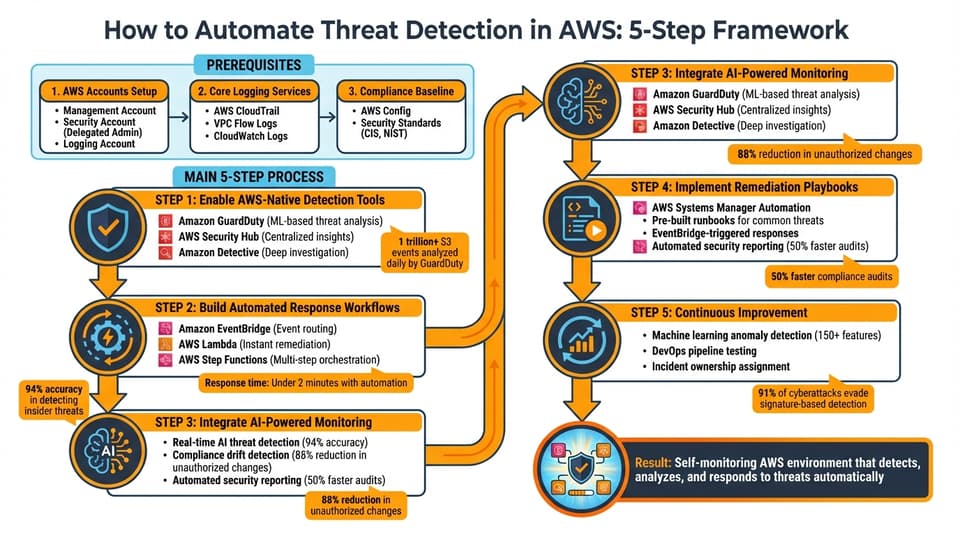
5-Step AWS Threat Detection Automation Workflow
AWS Security Automation: Detect & Quarantine Suspicious Activity
sbb-itb-d663cbd
Prerequisites for Automating Threat Detection in AWS
To get started with automating threat detection in AWS, you'll need to set up your accounts, enable logging services, and establish compliance baselines. These steps create the foundation for an effective automated security system.
Setting Up AWS Accounts and Permissions
Organize your AWS environment by creating three types of accounts within AWS Organizations:
- Management account: Handles administrative tasks and delegation.
- Security account: Acts as the Delegated Administrator for security services.
- Logging account: Stores all security logs and findings centrally.
This separation keeps security operations isolated from daily workloads, protecting critical audit data from unauthorized access.
The Security account should be designated as the delegated administrator for services like Amazon GuardDuty, Security Hub, and Amazon Detective. This setup allows centralized monitoring across your organization through a single interface. Before assigning this role, enable "Trusted Access" for each security service in the AWS Organizations console.
AWS automatically creates service-linked roles, such as AWSServiceRoleForAmazonGuardDuty, when you activate these services. These roles come with the necessary permissions to access and analyze foundational data sources without requiring manual configuration. Administrators can use AWS-managed policies like AWSSecurityHubFullAccess and AWSSecurityHubOrganizationsAccess for managing security.
To ensure new accounts are automatically protected, enable the "Auto-enable" feature in GuardDuty and Security Hub. Repeat this process in all AWS Regions, even those you don't actively use, to monitor for unauthorized activity in quieter regions.
| Account Type | Primary Responsibility | Key Permissions Required |
|---|---|---|
| Management Account | Organization administration and delegation | EnableOrganizationAdminAccount API access |
| Security Account | Centralized threat monitoring and remediation | AWSSecurityHubFullAccess, Delegated Admin status |
| Logging Account | Centralized log storage and archiving | S3 Bucket policies allowing s3:PutObject from services |
| Member Accounts | Workload hosting and log generation | Service-linked roles (e.g., AWSServiceRoleForAmazonGuardDuty) |
Once accounts and permissions are set up, the next step is to enable logging services to supply the data needed for threat detection.
Enabling Core Logging Services
Automated threat detection relies on raw data from AWS logging services. Here's how to set up the key ones:
- AWS CloudTrail: Tracks every API call and event across your infrastructure, creating a complete audit trail. Configure multi-region trails, enable log file validation, and set up organization-level trails to collect logs from all member accounts.
- VPC Flow Logs: Captures details about IP traffic to and from network interfaces in your VPC. This is critical for spotting unauthorized traffic or potential data exfiltration attempts. GuardDuty automatically pulls data from CloudTrail, VPC Flow Logs, and DNS query logs, so no manual enablement is needed.
- CloudWatch Logs: Acts as the central repository for log data. Use CloudWatch Metric Filters to trigger alarms for critical events like root account usage or unauthorized API calls. Enable CloudTrail Insights to detect unusual API activity or anomalies.
Store all security logs in your Logging account, encrypt them with AWS Key Management Service (KMS), and ensure compliance standards are met. Both GuardDuty and Detective offer a 30-day free trial, giving you time to assess data volumes and costs.
"Log ingestion should be verified periodically to validate that all logs necessary for detection are enabled and available, log ingestion pipelines are functioning, and alerts are initiating as intended." - AWS Cloud Adoption Framework
Once logging is in place, you'll need to configure AWS Config to monitor compliance and automate remediation.
Configuring AWS Config and Compliance Baselines
AWS Config plays a crucial role in automating threat detection. It continuously monitors resource configurations and provides a full inventory, helping you detect unauthorized changes that could introduce vulnerabilities.
Enable AWS Config in all member accounts and regions to ensure full visibility. Use AWS-managed rules to align with industry standards like the CIS AWS Foundations Benchmark or NIST. When Config identifies a resource that violates a rule, it marks it as "NON_COMPLIANT", triggering automated remediation workflows.
Set up notifications for non-compliance via Amazon SNS or EventBridge rules. You can also link AWS Config with AWS Systems Manager Automation runbooks to automatically fix configuration issues. Keep in mind that while Security Hub includes a 30-day free trial, AWS Config charges separately based on the number of configuration items and rule evaluations.
Step 1: Enable AWS-Native Threat Detection Tools
Once your AWS accounts, permissions, and logging services are set up, it's time to activate the threat detection tools that will keep an eye on your environment 24/7. AWS provides three built-in services designed to work together to detect, consolidate, and investigate security threats automatically.
Configuring Amazon GuardDuty
Amazon GuardDuty acts as your first layer of defense, continuously analyzing data from AWS CloudTrail management events, VPC Flow Logs, and Route 53 Resolver DNS query logs. Using machine learning and threat intelligence, it identifies unusual API calls, reconnaissance attempts, and potential malware activity across your AWS accounts.
Since GuardDuty is a regional service, make sure to enable it in all supported AWS Regions to ensure you catch unauthorized activity wherever it occurs. When activated, AWS automatically creates service-linked roles (like AWSServiceRoleForAmazonGuardDuty) to process data streams directly from other AWS services.
GuardDuty classifies findings into three severity levels: Low (suspicious activity), Medium (behavior deviations), and High (active compromise). By default, findings are updated every six hours, but you can adjust this to every 15 minutes for faster detection and response. Findings are retained in the console for 90 days, so configure automatic exports to an Amazon S3 bucket if you need to store them longer.
To broaden your threat detection capabilities, consider enabling specific protection plans tailored to your workloads. For example:
- S3 Protection: Monitors data events like GetObject and ListObjects.
- EKS Protection: Analyzes Kubernetes audit logs.
- RDS Protection: Tracks database login activity.
- Lambda Protection: Observes network activity for serverless functions.
- Runtime Monitoring: Captures OS-level events on EC2, EKS, and ECS instances.
- Malware Protection: Performs agentless scans of EBS volumes for malicious software.
GuardDuty offers a 30-day free trial for new accounts in each region, giving you time to evaluate its capabilities and estimate costs. Additionally, its extended threat detection feature - designed to identify multi-stage attack sequences across various data sources - is enabled by default at no extra charge.
Next, consolidate your security findings with AWS Security Hub.
Using AWS Security Hub for Centralized Insights
AWS Security Hub brings together security findings from GuardDuty, AWS Config, and other services into a single dashboard. It uses the AWS Security Finding Format (ASFF), a JSON-based standard with over 1,000 fields, to normalize data from diverse sources.
To use Security Hub effectively, ensure AWS Config is enabled, as it's required for compliance findings and security checks. In multi-account setups, designate a delegated administrator account through AWS Organizations to manage findings across all member accounts. This account can also create policies to define which security standards and controls apply to accounts, organizational units, and regions.
Enable Security Hub in all supported regions for a comprehensive view of your environment, and choose an aggregator region to centralize findings from multiple areas. Security Hub enriches and normalizes findings, providing near real-time insights into potential threats. It also assigns security scores (ranging from 0 to 100) to help you monitor your security posture over time.
Start by enabling the AWS Foundational Security Best Practices standard, which includes a curated set of recommendations vetted by AWS experts. Findings remain in Security Hub for 90 days after their last update, but you can configure automation rules to update finding details, adjust severity levels, or suppress unnecessary alerts in near real time. By integrating Security Hub with Amazon EventBridge, you can trigger Lambda functions or Systems Manager runbooks for automated remediation when specific findings arise. Like GuardDuty, Security Hub offers a 30-day free trial for each account to help you estimate costs.
Finally, take your threat investigations further with Amazon Detective.
Analyzing Threats with Amazon Detective
Amazon Detective rounds out your toolkit by providing deeper investigative context for security findings. While GuardDuty alerts you to threats, Detective helps you understand the story behind them by automatically collecting and correlating log data from AWS CloudTrail, VPC Flow Logs, Amazon EKS audit logs, and GuardDuty findings.
"GuardDuty tells you about the threat, but Detective tells you the story around that threat." – Amazon Detective Hub Best Practices Guide
Detective uses graph theory and machine learning to map resource associations - like which IAM role created an EC2 instance, which IP addresses are interacting with it, or the sequence of API calls leading up to an incident. It stores and analyzes up to a year of aggregated data, allowing you to track behavior changes over time. This complements the quick alerts from GuardDuty and Security Hub, completing the detection-to-investigation workflow.
Before enabling Detective, ensure GuardDuty is active, as it's a prerequisite. Use the same delegated administrator account as GuardDuty and Security Hub within your AWS Organization, and activate the auto-enable feature to automatically enroll new accounts. Detective supports up to 1,200 AWS accounts per behavior graph.
The Finding Groups feature, powered by generative AI, clusters related security findings into a single event summary, mapping activities to the MITRE ATT&CK framework. For IAM-related investigations, Detective automatically flags indicators of compromise, such as "impossible travel", suspicious IP addresses, or unusual user agents. When reviewing GuardDuty alerts, the "Investigate with Detective" link provides immediate access to related entities and historical behavior. To streamline access for your security team, assign the AmazonDetectiveInvestigatorAccess managed policy, granting investigation permissions without full administrative rights.
Detective also includes a 30-day free trial per account when first enabled in a region, with pricing based on the volume of ingested data.
Step 2: Build Automated Response Workflows
Once you've set up your threat detection tools, the next step is connecting those detections to automated responses. This is where Amazon EventBridge becomes essential. Acting as the automation hub, EventBridge processes near real-time alerts from your security tools and triggers immediate actions.
Creating EventBridge Rules for Threat Triggers
EventBridge rules are built around two key elements: an event pattern to filter specific threats and a target that executes the appropriate response. For example, when GuardDuty identifies a compromised instance or Security Hub flags a critical misconfiguration, EventBridge routes that alert to the designated remediation workflow based on your rules.
In multi-account setups, configure these rules in your delegated administrator account. This ensures they can handle findings from any member account. To maintain consistency, filter Security Hub findings using identifiers like SecurityControlId or SecurityControlArn. You can also refine filters further by severity, such as targeting findings with a severity score from 7.0 to 10.0 (High to Critical).
Security Hub automation rules process findings first, allowing you to update or suppress alerts before EventBridge rules take over. By default, GuardDuty sends notifications to EventBridge every six hours for recurring findings, though you can adjust this interval for faster detection. Common targets for automated responses include:
- AWS Lambda for executing remediation code.
- AWS Step Functions for managing complex workflows.
- Amazon SNS for sending notifications.
"EventBridge rules are helpful when you want to take actions outside of Security Hub CSPM with regards to specific findings or send specific findings to third-party tools for remediation or additional investigation." – AWS Security Hub Documentation
To make alerts more user-friendly, use the EventBridge Input Transformer to convert raw JSON findings into readable messages before sending them to tools like SNS or Slack.
Using Lambda Functions for Remediation
AWS Lambda is one of the fastest ways to implement automated security solutions. It executes specific actions, such as isolating a compromised EC2 instance by modifying its security group or revoking IAM session credentials. With Lambda, you can reduce response times to under two minutes.
Start by automating responses to low-risk, high-confidence findings - like fixing public S3 buckets. Once comfortable, move to more complex actions, such as terminating compromised instances. Keep security tight by assigning Lambda execution roles with narrowly defined IAM permissions (e.g., ec2:ModifyInstanceAttribute or iam:DeactivateAccessKey). Store configuration details like Slack webhook URLs or quarantine security group IDs in environment variables to keep your code secure and portable.
"Manual incident response can take precious hours or even days, allowing attackers to cause significant damage or exfiltrate sensitive data." – Abdulhakeem Sulaiman, Cloud Security Engineer
Incorporate pre-check logic into your Lambda functions to verify the resource state before applying changes. This prevents disruptions to production systems. Always notify resource owners and security teams through SNS or Slack after executing an automated action. Log every action in CloudWatch and CloudTrail, and store results in S3 or DynamoDB for auditing and compliance purposes.
For cross-account scenarios, use AWS Step Functions in a central security account to assume IAM roles and trigger Lambda-based remediations. A good practice for EC2 remediation includes creating an EBS snapshot for forensic analysis before isolating the instance.
Orchestrating Multi-Step Responses with AWS Step Functions
While Lambda excels at single-task automation, AWS Step Functions is ideal for coordinating multi-step workflows. Using Amazon States Language (ASL), Step Functions can branch workflows based on factors like threat severity or type.
"Step Functions Standard Workflow's callback pattern can create a robust orchestration layer that allows administrators to review each change before approving or denying." – AWS Compute Blog
For high-risk actions, such as deleting IAM roles or isolating production instances, use the callback pattern. This workflow pauses and sends a unique task token to an administrator via SNS or email. The process resumes only when the token is returned via an API call, ensuring critical changes are reviewed before execution.
Step Functions Standard Workflows can maintain an execution state for up to a year. Since pricing is based on state transitions rather than idle time, it's a cost-effective choice for workflows that require manual approvals or long pauses.
When integrating Step Functions with Security Hub findings, configure EventBridge rules to filter by Control ID rather than title or description. Control IDs remain consistent even when AWS updates control names. For GuardDuty threat list updates, store the list in an S3 bucket with versioning enabled. This allows workflows to point GuardDuty to a specific version after an update, ensuring accuracy and traceability.
Step 3: Integrate AI-Powered Monitoring with Automate Security
This step builds on AWS-native tools, combining them with AI to boost monitoring accuracy and streamline operations.
Automate Security introduces an AI-driven layer that establishes behavioral baselines across 150+ features. This helps identify, prioritize, and respond to threats that static rules often miss, addressing the growing complexity of modern cyberattacks.
Using Real-Time AI Threat Detection
Automate Security processes threat data in seconds, dramatically cutting the time between detection and response. By analyzing behavioral patterns, it can detect insider threats with an impressive 94% accuracy. Unlike manual processes, which can take minutes or even hours, AI-driven responses act instantly once a threat is identified.
The platform integrates seamlessly with tools like CloudTrail, VPC Flow Logs, and GuardDuty findings. Using machine learning models such as Isolation Forest, it spots anomalies that traditional static rules might overlook. This approach minimizes false positives from older tools. By incorporating business context, resource ownership details, and historical data into each alert, Automate Security makes triage faster and ensures your team focuses on authentic threats.
Automating Compliance and Security Reporting
Automate Security simplifies compliance management with AI-powered drift detection. It continuously compares your live AWS setup against Infrastructure as Code baselines (e.g., Terraform), flagging unauthorized changes in real time. Natural Language Processing (NLP) engines analyze commit messages, pull requests, and Jira tickets to distinguish legitimate business updates from unauthorized alterations. This complements AWS’s native tools, offering a comprehensive approach to threat detection and compliance upkeep.
One global fintech company saw an 88% drop in unauthorized console changes after adopting this AI-driven drift detection system. The platform also automates evidence collection and creates immutable audit trails, enabling compliance audits to be completed 50% faster. When drift is detected, the system can even auto-generate GitHub Pull Requests to propose fixes or rollbacks, ensuring your security posture stays aligned with compliance standards.
Scaling Security Operations with Automate Security Plans
Automate Security provides three tailored plans to meet different organizational needs:
- Basic Plan: Ideal for small teams, offering essential threat detection, compliance management, and basic incident response tools.
- Professional Plan: Designed for mid-sized environments, it includes real-time monitoring and automated response workflows.
- Enterprise Plan: Built for large-scale infrastructures, it features custom strategies, continuous improvements, and advanced support.
All plans integrate seamlessly with Amazon GuardDuty, which processes over one trillion Amazon S3 events daily to detect suspicious activities. Additionally, Automate Security organizes operations into "Agent Spaces", allowing teams to structure threat detection and response by application or on-call group without increasing headcount. This setup creates a fully automated, scalable security ecosystem for AWS environments.
Step 4: Implement Automated Remediation Playbooks
Once threats are detected, automating responses can help reduce human error and ensure consistency. AWS Systems Manager Automation runbooks are a powerful tool for creating self-healing workflows that operate without manual intervention.
"The cloud should heal itself when something goes wrong." – Emmanuel Akuffo, Cloud DevOps Engineer
A good starting point is to focus on low-risk fixes, such as addressing public access issues in S3 buckets. For instance, in January 2026, a security framework used an SSM runbook to handle the S3_BUCKET_PUBLIC_READ_PROHIBITED finding. This runbook leveraged the aws:executeAwsApi action to call PutPublicAccessBlock, immediately setting all block configurations to true when a public bucket was detected. Since public S3 buckets rarely serve a valid business purpose, they are ideal candidates for automated remediation.
Using AWS Systems Manager for Remediation
AWS Systems Manager Automation runbooks offer pre-configured templates (search for AWSIncidents-) that can address common security issues. While these templates provide a strong foundation, tailoring them to your specific environment is often necessary.
To set up effective runbooks, you'll need two IAM roles:
- Runbook service role: Allows Incident Manager to initiate workflows.
- Automation AssumeRole: Grants permissions for the individual commands within the runbook.
Dynamic parameters, such as ARNs for affected resources or an Incident ARN, should be included to ensure the remediation targets the right assets.
For more complex scenarios, multi-step workflows are essential. For example, one implementation in January 2026 addressed unencrypted EBS volumes by creating a snapshot of the unencrypted volume, copying it with encryption enabled, creating a new encrypted volume, and swapping it with minimal downtime. Similarly, to resolve an INCOMING_SSH_DISABLED Config rule failure, a playbook was created to use the ec2:RevokeSecurityGroupIngress API, removing ingress rules for TCP port 22 from the 0.0.0.0/0 CIDR range. Guardrails, such as pre-checks to verify resource states, and updates to CloudFormation templates to avoid stack drift, are critical for ensuring these workflows run smoothly.
Once your runbooks are set up, you can route them through Amazon EventBridge for immediate execution.
Triggering Playbooks with EventBridge
Amazon EventBridge is an effective way to connect threat detections to remediation workflows. You can create rules that specify the source of the event - such as aws.securityhub, aws.guardduty, or aws.config - and filter by criteria like severity level or compliance status.
Using Control IDs as filters is particularly useful because they remain static even if titles change. Input Transformers can map fields like resourceId or findingId to runbook parameters, ensuring accurate targeting. For high-severity issues with low false-positive rates (e.g., public S3 buckets or open SSH ports), fully automated remediation is appropriate. For more complex scenarios or changes with potential business impact, you can use Security Hub’s custom actions to allow analysts to manually trigger playbooks.
| Threat Scenario | Detection Tool | SSM Remediation Action |
|---|---|---|
| Public S3 Bucket | Security Hub / Config | s3control:PutPublicAccessBlock |
| Open SSH Port (0.0.0.0/0) | AWS Config | ec2:RevokeSecurityGroupIngress |
| Root Account Access Key | Security Hub | iam:DeactivateAccessKey |
| Unencrypted EBS Volume | AWS Config | Snapshot, Encrypt-Copy, and Volume Re-attachment |
To maintain transparency and compliance, notify stakeholders and preserve forensic evidence during remediation. For example, when isolating a compromised EC2 instance, create EBS snapshots to retain evidence for future investigations. Additionally, store all runbook execution results in a centralized location, such as DynamoDB or S3, to maintain a detailed audit trail.
Step 5: Best Practices for Continuous Threat Detection
Setting up automated threat detection is just the beginning. To stay ahead of evolving threats, organizations need to fine-tune and enhance their detection systems over time. Think of it as an ongoing process where detection and response mechanisms grow more advanced alongside your security needs. For instance, tools like AWS Security Hub can act as a central hub, triggering EventBridge rules for automatic remediation as your security capabilities expand. Below are key practices to integrate machine learning, validate defenses in DevOps workflows, and assign accountability for incident resolution.
Using Machine Learning for Anomaly Detection
Traditional detection methods often fall short when faced with modern attack techniques. Machine learning steps in by creating dynamic behavioral baselines rather than sticking to rigid, rule-based approaches. Take Amazon GuardDuty, for example - it evaluates over 150 behavioral features to detect threats, achieving up to 94% accuracy in identifying insider risks. It also cross-references findings against a vast database of over 45 million malicious IP addresses and 100,000+ malicious domains in real time.
Another useful tool is CloudWatch Anomaly Detection, which monitors critical system metrics like CPU usage and network traffic. This monitoring helps identify unusual patterns, such as unexpected data transfers or off-hours access attempts. These tools ensure your detection system adapts to changing threats instead of relying on outdated signatures.
Testing Detection and Response in DevOps Pipelines
Automated workflows are only as good as their performance in real-world scenarios. Regular testing is essential to ensure these systems function as intended. Tools like the open-source GuardDuty Tester simulate various threat scenarios, including crypto mining, reverse shells, and unauthorized IAM activity, across environments like EC2, S3, EKS, and Lambda. Running these tests in a dedicated non-production account allows you to validate that EventBridge rules, Lambda functions, and SSM runbooks work as expected.
"Threat detection teams should exercise and test detections regularly through real-world scenarios and production environments to confirm detections are operating as intended." – AWS Cloud Adoption Framework
This proactive approach, often referred to as "shift-left", catches vulnerabilities early in the development lifecycle. It minimizes the number of security issues that make it into production. Additionally, integrating tools like AWS CloudFormation Guard into your CI/CD pipeline helps flag misconfigurations before deployment. To add another layer of control, versioning your detection logic allows for quick rollbacks if new rules cause unintended disruptions.
Assigning Ownership for Incident Remediation
Automated remediation and response systems are powerful, but they need clear ownership to function effectively. A dedicated team should oversee event monitoring, fine-tune detection rules, and engage in proactive threat hunting to ensure swift responses. One way to streamline this process is by using resource tags to automatically route findings from Security Hub to the correct engineering teams, cutting down response times.
Feedback loops are another essential component. Lessons learned during incidents should feed back into refining detection rules and improving preventative controls. Additionally, Security Hub Automation Rules can help manage alert priorities - suppressing low-priority findings or escalating critical ones in production accounts. This reduces alert fatigue and ensures the team focuses on actionable threats. By combining clear accountability with continuous feedback, your security framework becomes more resilient and adaptive over time.
Conclusion
The final strategy ties together detection, response, and continuous improvement into a unified approach. Securing AWS environments effectively requires leveraging a mix of AWS-native tools, automation, and AI-driven insights. Enabling services like Amazon GuardDuty, AWS Security Hub, and Amazon Detective provides the groundwork for ongoing monitoring. Adding automated workflows with EventBridge, Lambda, and AWS Step Functions transforms your infrastructure into a system capable of responding to threats in seconds rather than hours.
"When we build automation around events that we know should not occur, it gives us an advantage over a malicious actor because the automation is able to respond within minutes or even seconds compared to an on-call support engineer." – AWS Security Blog
The numbers tell a compelling story: 91% of modern cyberattacks evade traditional, signature-based detection methods, while 68% of security teams struggle with overwhelming false positives. AI-powered tools like GuardDuty cut through this complexity, analyzing more than 150 behavioral features with up to 94% accuracy in detecting insider threats. This allows your team to focus on genuine risks rather than sifting through noise.
With automated security measures in place, your operations scale seamlessly alongside your workloads, providing consistent and repeatable remediation. By enabling core services such as GuardDuty and Security Hub, integrating AI-driven workflows, and rigorously testing your processes, you build a self-healing AWS environment. This intelligent infrastructure handles threats proactively, allowing your security team to prioritize strategic goals over routine incident management.
This strategy serves as a comprehensive roadmap - from activating essential services across all accounts and regions to developing automated playbooks for critical findings. Regularly test your workflows, assign clear roles for incident response, and refine your methods based on practical experience. These steps not only reduce response times and increase accuracy but also ensure your cloud security keeps pace with the demands of modern infrastructure.
FAQs
Which AWS findings should I auto-remediate first?
When it comes to security, prioritize addressing high-severity threats first. This includes tackling compromised EC2 instances, S3 buckets, or AWS credentials. These types of vulnerabilities pose the most serious risks to your environment. Acting quickly on these issues is essential to safeguard your systems and minimize potential damage.
How do I automate remediation across multiple AWS accounts?
To streamline remediation across several AWS accounts, leverage AWS Security Hub and AWS Systems Manager. Start by centralizing your security management in a dedicated account. Use Security Hub to aggregate findings from multiple accounts, making it easier to monitor and manage security issues in one place. Then, implement automation rules or Systems Manager runbooks to address these findings efficiently.
This approach ensures uniform and scalable responses to security incidents across your AWS environment. By utilizing AWS-native tools like GuardDuty, Security Hub, and Systems Manager, you can maintain a consistent and automated security posture across all accounts.
How can I reduce false positives in AWS threat alerts?
To cut down on false positives in Amazon GuardDuty alerts, you can use suppression rules. These rules allow you to exclude findings that are either low-value or known to be harmless. By tailoring the filtering criteria, you can focus on high-risk threats that truly need attention.
It's also important to manage and refine findings regularly. This ensures your alerts stay relevant and actionable, helping you maintain an efficient and effective security posture.