
How to Build a Zero Trust Architecture in 6 Steps
Step-by-step Zero Trust plan: inventory assets, enforce strong identity and MFA, segment networks, deploy DLP and detection, automate policies, and roll...

Zero Trust Architecture (ZTA) is a modern security framework based on the principle of "never trust, always verify" It assumes every access request, whether inside or outside the network, is untrusted until verified. This approach is crucial in today’s cloud-driven, remote work environments where traditional perimeter-based defenses no longer suffice.
Here’s a quick breakdown of the six steps to implement Zero Trust:
- Asset Inventory: Identify and catalog all hardware, software, cloud resources, users, and devices across your infrastructure.
- Identity and Authentication: Use strong identity verification methods like Multi-Factor Authentication (MFA) and centralized identity management.
- Network Segmentation: Divide your network into isolated zones to limit attacker movement and enforce strict access controls.
- Threat Detection and Data Protection: Monitor traffic, deploy Data Loss Prevention (DLP) tools, and use real-time threat intelligence.
- Policies and Monitoring: Write dynamic access policies, log all activity, and automate responses to security incidents.
- Phased Rollout: Gradually implement Zero Trust, starting with critical systems and expanding to the entire organization.
Why Zero Trust Matters:
- Prevents lateral movement: Attackers can’t move freely if a breach occurs.
- Limits access: Users only get permissions they need, when they need them.
- Supports cloud and remote work: Protects resources in hybrid and multi-cloud environments.
By following these steps, you can secure your systems, reduce risks, and meet modern security demands.
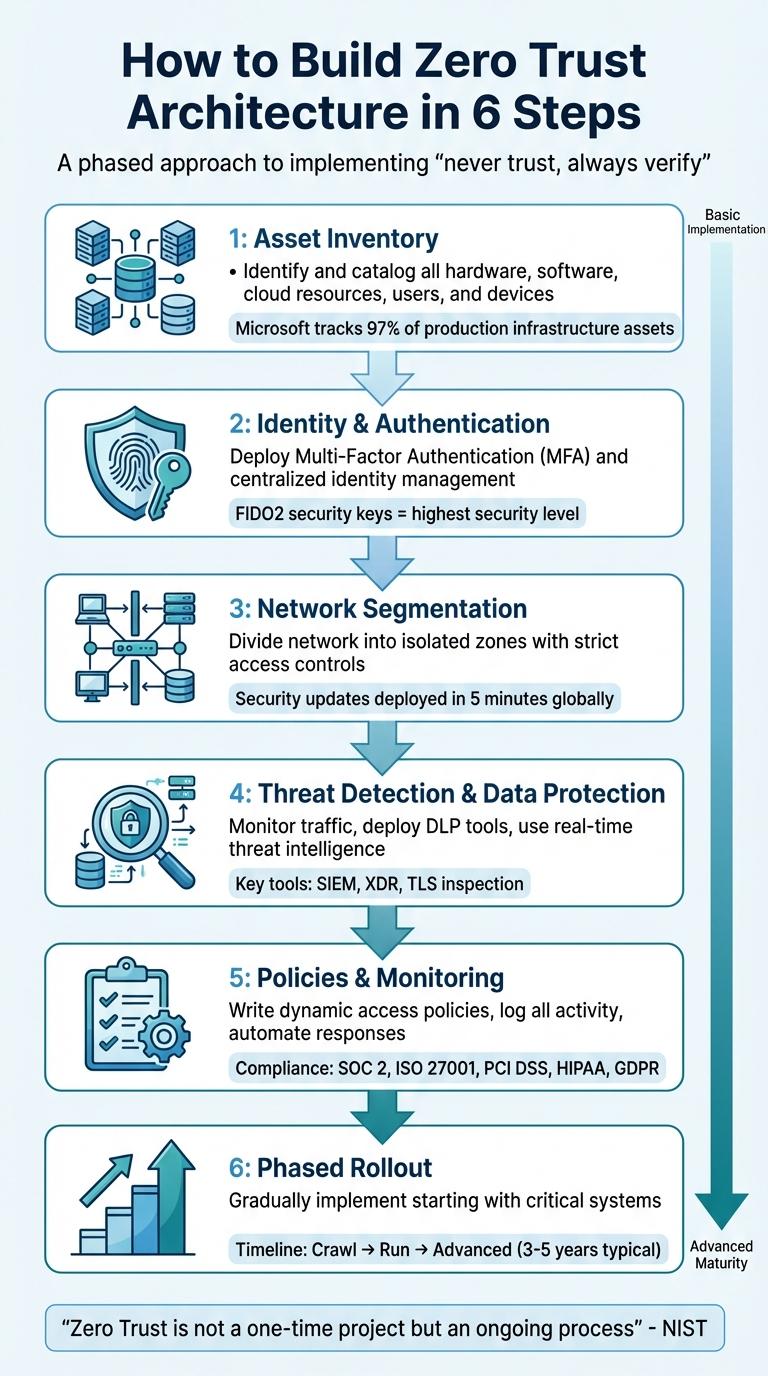
6 Steps to Implement Zero Trust Architecture
Zero Trust Security Architecture: Step by Step Guide for Modern Enterprises
sbb-itb-d663cbd
Step 1: Create a Complete Asset Inventory
Before implementing Zero Trust controls, it's essential to maintain a real-time, automated inventory of everything - hardware, software, applications, data, services, APIs, workloads, and third-party integrations. This inventory should span across on-premises, cloud, and hybrid environments.
As NIST highlights, "If resources are overlooked, it's likely that they won't be appropriately protected by the ZTA. They could be vulnerable to exfiltration, modification, deletion, denial-of-service, or other types of attack". The importance of this step is evident in Microsoft's experience. By analyzing Azure Kubernetes Service logs, they identified and removed over 730,000 unused applications that were unnecessarily expanding the attack surface.
To achieve this level of visibility, automated discovery tools are a must. These tools detect assets in real time and consolidate the information into a centralized system. For instance, Microsoft now tracks over 97% of its production infrastructure assets and ensures 99% of network devices emit standardized security logs, which are retained for two years. This comprehensive monitoring supports consistent policy enforcement and quicker threat detection.
Catalog All Users and Devices
In addition to inventorying infrastructure assets, it's crucial to catalog users, devices, and service accounts. This includes employees, contractors, partners, and automated systems. Unified Endpoint Management (UEM) tools can simplify this process, offering centralized tracking for laptops, smartphones, tablets, and even IoT devices.
Asset discovery often uncovers surprises - like printers, cameras, or personal devices connected to the network without IT's approval. These overlooked devices can serve as gateways for attackers. Extending this inventory to cloud resources ensures no gaps remain.
Document Your Cloud Resources
Once users and devices are accounted for, focus on your cloud environment. Application Dependency Mapping tools can automatically identify the resources each application relies on, such as databases, servers, APIs, and load balancers.
To gain deeper insight, deploy next-generation firewalls in "virtual wire" (vwire) mode for transparent network monitoring. This helps you understand not only what resources exist but how they communicate and the business rules governing their interactions. Tools like Terraform, which follow Infrastructure as Code (IaC) principles, can document and audit resources as they’re created, ensuring traceability and preventing unauthorized deployments.
Find Unauthorized Tools and Applications
Unauthorized tools and services - commonly referred to as shadow IT - pose a major risk. Employees often use these without security oversight, creating blind spots in your defenses. SaaS Security APIs and tools like Microsoft Defender for Cloud Apps can help identify unauthorized SaaS applications and even generative AI tools being used in your organization.
Inactive applications are another vulnerability. By analyzing logs, you can flag and phase out these apps. Microsoft’s approach is a useful example: identify inactive apps, confirm their status with owners, and then carefully remove them. This method ensures critical but low-usage functions aren't disrupted while reducing the attack surface.
Prioritize Assets by Sensitivity
Once your inventory is complete, classify assets based on their sensitivity. For example:
- High Sensitivity: PII, source code, Active Directory.
- Moderate Sensitivity: Business data, email.
- Low Sensitivity: Non-critical applications.
This classification helps guide your Zero Trust rollout. Start with the most critical assets to ensure they’re protected first.
"A complete, accurate, and close to real-time inventory of all production assets is foundational... enabling consistent policy enforcement, trusted telemetry, and accelerated threat detection and response." – Microsoft Learn
Step 2: Strengthen Identity and Authentication
Once you’ve mapped out your asset inventory, the next step is to lock down access. In a Zero Trust model, identity takes center stage as the new security boundary. As Microsoft aptly states, “Identity is central to a successful Zero Trust strategy”. This approach requires moving past simple passwords and verifying every user and device explicitly before granting access. Two key controls form the backbone here: Multi-Factor Authentication (MFA) and centralized identity management. Together, they significantly reduce vulnerabilities and strengthen your defenses.
Deploy Multi-Factor Authentication (MFA)
MFA is the heart of the “Verify Explicitly” principle. It works by requiring users to confirm their identity using a mix of factors: something they know (like a password), something they have (like a security key), or something they are (like a fingerprint). Cloudflare highlights its importance, noting, “MFA is significantly more secure than single-factor authentication, due to the difficulty, from the attackers’ perspective, of stealing two factors that belong together”.
However, not all MFA methods are equally secure. Older methods, such as SMS codes, are increasingly vulnerable to modern threats like SIM swapping and phishing. Recognizing this, the U.S. Federal Government now mandates phishing-resistant MFA for federal agencies, as outlined in OMB Memorandum M-22-09. High-assurance methods like FIDO2 hardware security keys or biometric-based WebAuthn are recommended for sensitive accounts and systems.
Modern MFA solutions can also be adaptive or risk-based. Instead of challenging users every time they log in, these systems evaluate contextual signals - such as location, device type, or time of access - and only trigger additional verification when something seems off. For instance, tools like Microsoft’s Conditional Access can block access or require a password reset if suspicious activity is detected.
| MFA Method | Security Level | Vulnerabilities |
|---|---|---|
| FIDO2 / Security Keys | Highest | Extremely difficult to phish; requires physical hardware |
| Biometrics (WebAuthn) | High | Requires physical presence; hard to replicate |
| Authenticator Apps (TOTP) | Medium | Vulnerable to MFA fatigue and advanced phishing |
| SMS / Voice Codes | Low | Susceptible to SIM swapping and interception |
Another critical step is disabling outdated protocols like SMTP or IMAP, which often bypass MFA and are favorite targets for credential replay attacks.
Set Up Centralized Identity Management
A centralized Identity Provider (IdP) is essential for enforcing consistent security policies. Without this, you risk creating “shadow” identity systems where credentials are scattered across multiple apps, increasing exposure to phishing and MFA fatigue.
By centralizing identity management, you ensure that verified identities remain secure across all platforms. Implement Single Sign-On (SSO) to streamline access and enforce Role-Based Access Control (RBAC), allowing users to access only the resources they need. Modern cloud apps can use protocols like SAML or OAuth 2.0, while legacy on-premises systems can connect via application proxies. Federating cloud identities with existing systems, such as Active Directory, helps maintain a smooth flow of user data and security updates.
For added security, pair RBAC with Just-In-Time (JIT) access through Privileged Identity Management (PIM). This grants temporary elevated permissions only when necessary, reducing the risk of standing privileges that attackers could exploit.
Another game-changer is Continuous Access Evaluation (CAE). Unlike traditional access tokens that expire after 60–90 minutes, CAE enables near real-time access revocation. For example, if a device falls out of compliance or an account is disabled, access can be revoked immediately, even if the token is still valid. This allows tokens to remain active for up to 24 hours while maintaining dynamic security.
Finally, automate the identity lifecycle to simplify user provisioning and de-provisioning. Use identity governance tools to handle access requests, approvals, and periodic reviews. This ensures that only the right individuals have access and that former employees or contractors are promptly removed from the system.
"The zero-trust model shifts the security focus from perimeter-based security to an approach where no user or device is considered to be inherently trustworthy." – Google Cloud
Step 3: Implement Network Segmentation and Access Control
Once identity controls are in place, the next step is to ensure attackers can't roam freely within your network. Network segmentation does exactly that - it breaks your infrastructure into separate zones, so even if one area is breached, the damage is contained. Microsoft sums it up well:
"Assume breach: Minimize blast radius and segment access. Verify end-to-end encryption and use analytics to get visibility, drive threat detection, and improve defenses".
This approach shifts the focus from simply guarding the perimeter to controlling internal movement, where the real risks often lie.
Create Network Segments
Traditional networks tend to trust internal traffic by default. However, Zero Trust principles take a stricter approach, dividing the network into isolated sections, each functioning as its own secure boundary. Access is granted only as needed.
To protect these segments, deploy segmentation gateways like Next-Generation Firewalls (NGFWs) or Network Virtual Appliances near critical resources. Palo Alto Networks highlights this strategy:
"The cornerstone of the architecture is segmentation gateways... that connect and protect your network segments and enforce Layer 7 policy".
These gateways monitor east-west traffic - the data flowing between internal systems - at the application level, stopping threats in real time. When new malware emerges globally, automated tools like WildFire can update security settings across your segments in as little as 5 minutes.
Modern segmentation tools go beyond static IP rules, using dynamic identity and device health data. Solutions such as Azure Network Security Groups (NSGs), Application Security Groups (ASGs), and Cisco TrustSec rely on Dynamic Security Group Tags (SGTs) to automatically adjust access as conditions change. If a device starts acting suspiciously, the system can issue a Change of Authorization (CoA) to isolate the compromised host and revoke its access instantly.
Create and Enforce Access Policies
Segmentation only works if paired with strict, identity-based access policies. Instead of broad permissions, policies should define access based on who the user is (User-ID), what they need (App-ID), and how traffic is inspected (Content-ID). Microsoft’s Azure Well-Architected Framework underscores this point:
"Identity is a perimeter that should be the primary line of defense to authenticate and authorize access across isolation boundaries, regardless of where the access request originates".
To tighten control, use temporary access mechanisms like Just-In-Time (JIT) or Just-Enough-Access (JEA) protocols. Automate policy enforcement with metadata tags that dynamically group workloads, ensuring new resources inherit the right security settings without manual intervention. For cloud environments, route all inter-subnet traffic through a firewall or Network Virtual Appliance using User-Defined Routes (UDRs) to enable deep packet inspection. For microservices, a service mesh can provide automatic mutual TLS (mTLS) encryption and service-to-service authentication.
| Policy Dimension | Description | Enforcement Tool |
|---|---|---|
| Who (User-ID) | Authenticated identity and group membership | Identity Provider (IdP) |
| What (App-ID) | Specific application or service being accessed | NGFW / Segmentation Gateway |
| How (Content-ID) | Inspection for threats, malware, and data leaks | DLP / Threat Prevention Services |
| Where | Source and destination zones or microperimeters | Network Security Groups (NSG) |
| When | Time-based access windows | Conditional Access Policies |
Use Zero Trust Network Access (ZTNA)
Traditional VPNs often grant users overly broad access once authenticated, which clashes with Zero Trust principles. Zero Trust Network Access (ZTNA) offers a better alternative by providing secure, session-based access to specific applications - without exposing the entire network. As NIST SP 800-207 explains:
"Zero trust focuses on protecting resources (assets, services, workflows, network accounts, etc.), not network segments, as the network location is no longer seen as the prime component to the security posture of the resource".
ZTNA tools like Cloudflare Access, Google’s Identity-Aware Proxy (IAP), and Azure Bastion use Identity-Aware Proxies and centralized Identity Providers (IdP) with protocols like SAML or OpenID Connect (OIDC) to verify users before granting access. These solutions often rely on outbound-only connections from applications to a security cloud, eliminating the need for open inbound firewall ports. For added security, ZTNA integrates device posture telemetry from tools like Crowdstrike, SentinelOne, or Microsoft Intune to confirm a device’s health before allowing access.
For larger deployments, platforms like Azure Virtual WAN can handle throughput of 50 Gbps per hub and connect up to 1,000 branch sites. ZTNA is also becoming a key component of Secure Access Service Edge (SASE) frameworks, which combine networking and security into a single cloud-based solution. For unmanaged devices or contractors, Remote Browser Isolation (RBI) enables secure interaction with applications without transferring data outside the secure cloud.
"Zero Trust operates on the principle of 'Never trust, always verify' and implements continuous authentication and strict access controls for all users, devices, and applications, regardless of their location or network." – Cloudflare Reference Architecture
With segmentation and access control in place, the next step is to focus on advanced threat detection and data protection.
Step 4: Deploy Threat Detection and Data Protection
At this stage, it's all about maintaining constant vigilance and protecting sensitive data. Strengthen your Zero Trust framework by incorporating continuous monitoring and data protection measures. The Zero Trust model operates under the assumption that threats can emerge from any source - whether inside or outside your network - making these steps crucial for a well-rounded defense.
Monitor Network Traffic
Threat detection starts with visibility into Layer 7 traffic. This means examining application-level traffic to pinpoint the specific apps being used, regardless of the port or protocol. To achieve this, TLS/SSL inspection is a must - it decrypts encrypted traffic, exposing hidden threats. As Palo Alto Networks aptly states:
"You can't protect your enterprise against threats you can't see."
To avoid disrupting workflows, focus TLS inspection on specific user groups or hostnames. Deploy a trusted CA certificate across managed devices to streamline decryption, and create "Do Not Inspect" lists for sensitive applications, like banking or healthcare, or for devices where privacy is a concern.
Advanced tools can also analyze behavior, flagging anomalies such as unusual login times or locations. Pair these tools with SOAR (Security Orchestration, Automation, and Response) platforms to automate responses, such as isolating compromised accounts or quarantining suspicious devices.
| Category | Recommended Tools |
|---|---|
| Network Monitoring & TLS Inspection | Cloudflare Gateway, Palo Alto Networks Strata Logging Service, Cilium Hubble |
| Threat Detection & XDR | Microsoft Defender for Cloud, Cortex XDR, Falco |
| SIEM & Orchestration | Microsoft Sentinel, Cortex XSOAR |
Once network monitoring is in place, shift your focus to preventing sensitive data from leaking out.
Set Up Data Loss Prevention (DLP)
DLP solutions are designed to stop unauthorized data transfers by monitoring and blocking them. Start by identifying and categorizing sensitive data, such as PII, PHI, or financial records.
Use tools like regular expressions, dictionaries, or Exact Data Match (EDM) to create detailed DLP profiles. EDM is especially useful for protecting sensitive PII because it compares hashed data and redacts matches in logs, minimizing exposure risks. Begin with a "monitor-first" approach to gauge false positives before applying strict enforcement. Focus on high-risk data types (e.g., Social Security numbers) and destinations (like AI chatbots or public file-sharing platforms).
Extend DLP protections to endpoints running on Windows or macOS, ensuring data security as it transitions from devices to the cloud. Configure alerts to notify users when policies are violated, including links to security guidelines to increase awareness. Tools like Activity Explorer can help you review labeling and DLP matches, refining policies to reduce unnecessary alerts.
To stay ahead of evolving risks, integrate DLP with real-time threat intelligence.
Use Real-Time Threat Intelligence
Threat intelligence provides up-to-date insights into emerging risks, including malicious IPs and command-and-control (C2) servers. For example, Microsoft Defender Threat Intelligence analyzes infrastructure and delivers actionable insights for swift responses. Microsoft Sentinel, a cloud-native SIEM and SOAR platform, integrates signals from detection tools to proactively hunt for threats.
Palo Alto Networks' Cloud-Delivered Security Services (CDSS) offers malware prevention, C2 protection, and DNS security. WildFire identifies both known and zero-day malware, while Advanced DNS Security blocks connections to harmful sites. Cortex XDR uses machine learning and telemetry across endpoints, networks, and cloud environments to detect unusual behavior that might signal an attack.
Combine SIEM and XDR tools for a unified view of incidents and automated responses. SOAR capabilities can handle predictable incidents automatically, freeing up your team to tackle new threats. Platforms like Cortex XSOAR enable automated playbooks, cutting response times from days to minutes. Honeypots - decoy systems designed to attract attackers - can also help detect intrusions early, before they cause significant damage.
| Solution Category | Specific Tools | Primary Function |
|---|---|---|
| SIEM / SOAR | Microsoft Sentinel, Cortex XSOAR | Centralized logging, visibility, and automated incident response |
| XDR Platforms | Microsoft Defender XDR, Cortex XDR | Cross-domain detection and response using machine learning |
| Threat Intelligence | Defender TI, WildFire, DNS Security | Feeds for malware signatures, malicious URLs, and C2 infrastructure |
With these systems in place, you're well-equipped to detect threats and protect your data. The next step is to formalize your security policies and implement comprehensive logging and monitoring frameworks.
Step 5: Create Policies, Logging, and Monitoring Systems
Once you've set up threat detection and data protection, it's time to focus on the daily operations of Zero Trust. This involves crafting clear security policies, implementing logging systems, and automating processes to maintain visibility and compliance.
Write Security Policies
Zero Trust security policies are dynamic and built on code. They evaluate multiple factors - like user identity, device health, location, and behavioral patterns - before granting access. Instead of offering broad, permanent access, these policies work on a per-session or per-request basis.
To manage policies effectively, consider Policy-as-Code (PaC). This approach treats security policies as code, stored in version control and tested in CI/CD pipelines, ensuring consistency and auditability across your infrastructure. Tools like Open Policy Agent (OPA), Gatekeeper, or Kyverno can enforce these policies in cloud-native environments. For example, you could block deployments without security labels or deny access to sensitive data unless multi-factor authentication is used.
Policies should also incorporate micro-segmentation, creating isolated zones around critical resources to limit lateral movement. Layer 7 policies can further protect against unauthorized access. Establishing a centralized governance framework helps define roles, responsibilities, and decision-making processes for managing policies and risks. As AWS puts it:
"Your ability to authentically represent what Zero Trust will look like within your organization will substantially increase after you start building and deploying it (rather than analyzing and talking about it)."
Zero Trust policies are also crucial for meeting compliance standards. Here's how they align with various frameworks:
| Compliance Standard | Zero Trust Controls That Support Compliance |
|---|---|
| SOC 2 | Strong access controls, continuous monitoring, audit logging |
| ISO 27001 | Risk-based access decisions, information security management |
| PCI DSS | Network segmentation, encrypted communications, access monitoring |
| HIPAA | Granular access controls, data encryption, audit trails |
| GDPR | Privacy-by-design, data access logging, breach detection |
| OMB M-22-09 | Phishing-resistant MFA, device certificates, encrypted DNS |
With these policies in place, the next step is to ensure visibility and rapid response to incidents.
Implement Logging and Incident Response
Centralized log aggregation is essential for monitoring your cloud environment. Collect identity logs (e.g., from Entra ID), network traffic, and application data, and feed them into a SIEM tool like Microsoft Sentinel or IBM QRadar. Enable diagnostic settings to capture changes and unauthorized access attempts across all resources.
To gain deeper insights, gather telemetry from five layers: Identity (user/service tracking), Network (traffic analysis), Runtime (syscall anomalies), Deployment (manifest changes), and Vulnerability (risk exposure). Tools like Falco or Tetragon, which use eBPF technology, can help monitor system calls and detect unauthorized actions.
Ensure your log analytics workspace retains data for 90 to 730 days to meet regulatory needs like GDPR, HIPAA, and PCI DSS. A minimum of 90 days is often required to perform effective root cause analysis during incident investigations.
For real-time risk management, set up systems to automatically flag high-risk activities, such as suspicious sign-ins or privileged role activations. SOAR playbooks can notify teams or isolate compromised accounts when alerts are triggered. Monitoring Just-In-Time (JIT) access provides an extra layer of security, distinguishing between legitimate role activations and potential threats. This approach supports a "trust-by-exception" model.
Continuous monitoring feeds into automated responses, reinforcing your Zero Trust framework.
Automate Policy Enforcement
Relying on manual enforcement can leave gaps in your defenses. Automation ensures policies are consistently applied, even as your environment evolves.
Integrate automated security checks into your CI/CD pipelines to ensure every deployment meets security requirements before reaching production. For instance, if a container lacks proper network policies or a developer tries to access production data from a development environment, the pipeline can block the deployment and provide immediate feedback.
Tagging and dynamic address groups (DAGs) can automate the quarantine of compromised systems based on log events. For example, if a threat detection system flags a device as compromised, automation can isolate it instantly, preventing further risks without manual intervention.
The Zero Trust Security Loop offers a continuous improvement framework: define policies as code, verify deployments, collect telemetry, and refine policies based on that data. This cycle helps adapt to new threats and changing needs without constant manual updates.
For legacy systems that can't handle modern protocols, security proxies or wrappers can manage multi-factor authentication and session handling before forwarding requests to the application. Implementing a full Zero Trust Architecture often takes 3–5 years. Start with high-impact changes, like replacing VPNs with Zero Trust Network Access and adopting phishing-resistant MFA, before moving to advanced analytics.
These measures close the loop on your Zero Trust strategy, ensuring continuous verification and quick responses across your cloud environment. With robust policies, monitoring, and automation in place, you're ready to move toward a phased rollout.
Step 6: Roll Out Zero Trust in Phases
Rolling out Zero Trust isn't something you can rush. It’s a step-by-step process that requires thoughtful planning and adjustments. A phased approach ensures smoother implementation, minimizes disruptions, and helps you address potential security gaps as they arise.
Plan Your Rollout Phases
The first step is identifying which systems to tackle based on their risk and importance to your business. Start with systems holding sensitive data or those critical to daily operations and remote workforces.
A practical way to approach this is through the "Crawl, Walk, Run" strategy:
- Crawl Phase: Lay the groundwork with Identity, Credential, and Access Management (ICAM), multi-factor authentication (MFA), and endpoint protection.
- Run Phase: Add specialized tools like advanced policy engines, cloud integration, and device discovery.
- Advanced Phase: Implement features like microsegmentation, Secure Access Service Edge (SASE), and automated response systems.
Microsoft suggests starting with basic identity and device access policies that don’t require full device enrollment. Once those are in place, you can move to stricter policies for managed and compliant devices. Meanwhile, the National Institute of Standards and Technology (NIST) advises isolating high-risk resources into their own trust zones, protected by Policy Enforcement Points (PEPs), while grouping lower-risk resources together initially.
Before enforcing any policies, use discovery tools to map out current traffic patterns. This helps you understand how resources are accessed and ensures you maintain essential business workflows. As NIST points out:
"Creating a ZTA is not a one-time project but an ongoing process."
To illustrate the variety of approaches, the NIST National Cybersecurity Center of Excellence has worked with 24 collaborators to create 19 example Zero Trust Architecture implementations.
| Deployment Phase | Focus Areas | Key Components |
|---|---|---|
| Crawl Phase | Baseline Identity & Endpoints | ICAM, MFA, Endpoint Protection, Basic Conditional Access |
| Run Phase | Advanced Policy & Cloud | Policy Engines, Device Discovery, Cloud Integration |
| Advanced Phase | Network & Optimization | Microsegmentation, SASE, Automated Response Systems |
With this roadmap, you can move forward confidently, testing everything in a controlled environment.
Test and Validate Security Controls
Before fully enforcing Zero Trust policies, run them in a test mode. This lets the system flag policy violations without blocking traffic. By doing this, you can compare actual traffic flows with your intended policies and identify any mismatches.
During testing, look for "red lines" - traffic that violates policy. If these flows are legitimate, adjust your policies to accommodate them. If not, ensure they remain blocked during enforcement. As Raghu Nandakumara from Illumio explains:
"Zero Trust is not an outcome of itself but a security strategy."
Test your controls under different scenarios. This includes access attempts from both managed and unmanaged devices, compliant and non-compliant endpoints, and authorized versus unauthorized users. Don’t forget to validate service-to-service communication, not just user-to-application traffic.
Using automated tools like Mandiant Security Validation can help continuously audit the decisions made by your Policy Decision Point. Establish baselines for normal network behavior so you can spot anomalies, suspicious activity, or spikes in data transfer that might signal a problem.
When transitioning to "Enforced mode", take it slow. Roll out one workload at a time, allowing for a "soak period" to ensure everything runs smoothly before expanding further.
Once your testing confirms stability, keep refining your approach to maintain strong security.
Review and Update Regularly
Zero Trust isn’t a one-and-done solution - it requires constant updates. Threats evolve, technology changes, and business priorities shift. Regular reviews help ensure your Zero Trust setup stays effective and relevant. Key triggers for updates include new threats, regulatory changes, technology upgrades, or shifts in the value of protected resources.
A dedicated Security Operations Center (SOC) can monitor logs and alerts, adjusting policies as needed. Schedule regular reviews of traffic logs, especially for sensitive applications, and analyze findings from Cloud Access Security Broker scans.
Real-time monitoring is essential to ensure that actual network activity aligns with your defined security policies. Conduct periodic tests across various scenarios - whether on-premises or in the cloud, from managed or unmanaged devices - to verify that your controls are working as intended. NIST emphasizes:
"As the threat landscape changes, the organization's CISO and security team need to continually assess the ZTA's topology, components, and policies to ensure that they are best designed to address newly emerging threats."
Use tools like Terraform or Ansible to automate updates and prevent configuration drift. Microsoft reinforces the guiding principle:
"Regardless of where the request originates or what resource it accesses, the Zero Trust model teaches us to 'never trust, always verify.'"
Conclusion: Building Your Zero Trust Architecture
Zero Trust Architecture isn't a one-time project - it's a continuous security strategy that requires ongoing commitment and refinement. This guide covered six key steps to help you establish a Zero Trust Architecture: compiling a thorough asset inventory, enhancing identity and authentication measures, applying network segmentation and access control, deploying threat detection and data protection systems, setting clear policies and monitoring mechanisms, and implementing Zero Trust in phases.
Taking a phased approach is essential. By gradually rolling out these steps, you can create a strong foundation for your security framework while achieving measurable results with the resources you have. Many organizations have already adopted Zero Trust frameworks, and experts highlight that starting small and scaling up is the most effective way to succeed.
Early wins are crucial. Begin by focusing on your most sensitive data and critical business functions, then expand the scope in manageable steps. This not only builds momentum but also ensures progress is steady and sustainable.
Zero Trust changes the game by shifting from a reactive security model to a proactive one. It relies on just-in-time access and continuous verification to reduce vulnerabilities. To ensure long-term success, design your architecture to scale with future growth and technological advancements. Establishing clear KPIs - like reducing standing access and minimizing security incidents - will help you track your progress and justify further investment.
At its core, Zero Trust operates on the principle of assuming breaches and verifying every request. By following these steps and committing to regular updates and monitoring, you can build a security posture that not only deters attackers but also adapts to evolving threats.
FAQs
Where should I start with Zero Trust first?
To get started with Zero Trust, begin with a comprehensive assessment and planning phase. Take a close look at your current security setup, pinpoint any weaknesses, and establish clear security objectives. Next, define your protect surface (the most critical assets you need to safeguard), map out how transactions flow across your network, and draft a detailed implementation plan. By following this step-by-step process, you can ensure a well-organized and effective Zero Trust deployment that aligns with your organization's specific requirements.
How do I measure Zero Trust progress over time?
To measure your progress with Zero Trust, leverage tools and frameworks specifically built for this purpose. Use resources like the Zero Trust Maturity Model to evaluate where you stand and pinpoint areas for improvement. Regular assessments are key to identifying gaps in your approach. Hosting workshops and documenting outcomes can provide clarity and guide adjustments to your strategy. Make it a habit to revisit your initial baseline periodically, comparing updates to track improvements and ensure your efforts stay aligned with Zero Trust principles.
What should I do about legacy apps that can’t support MFA?
When dealing with legacy apps that don't support MFA in a Zero Trust Architecture, it's crucial to limit their exposure. One effective approach is to use network segmentation or microsegmentation to create isolated environments, reducing potential risks.
Additionally, enforce strict access controls to ensure only authorized users can interact with these apps. To further strengthen security, consider implementing compensating measures like continuous monitoring or anomaly detection to spot unusual activity quickly.
If integrating MFA isn't an option yet, explore alternative authentication methods as a temporary solution. These actions collectively help reduce vulnerabilities and support a robust security framework.