
CSPM Tools for Cloud Misconfiguration Detection
CSPM automates discovery, prioritization, and remediation of cloud misconfigurations across AWS, Azure, and GCP to improve security and compliance.
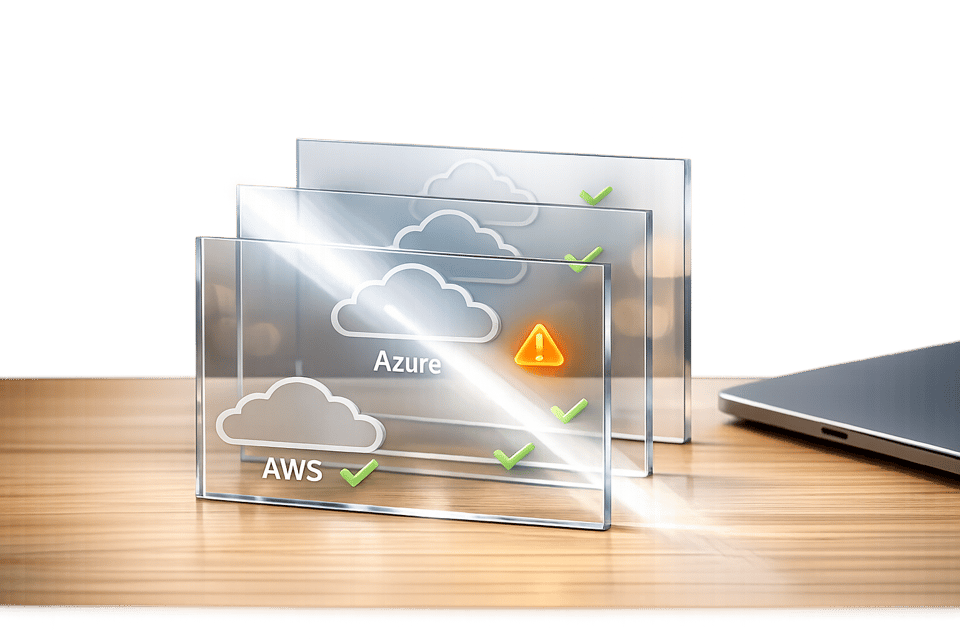
Cloud misconfigurations are a major security risk, causing over 90% of cloud-related breaches. Tools like Cloud Security Posture Management (CSPM) are essential for identifying and fixing these issues. CSPM automates the process of detecting misconfigurations, monitoring cloud environments, and ensuring compliance with security standards.
Key Insights:
- Misconfigurations: Account for 65–70% of cloud security issues and cost businesses billions.
- Manual Management Fails: Human error causes 82% of misconfigurations, making manual oversight ineffective.
- CSPM Benefits:
- Real-time monitoring and detection
- Automated remediation for faster fixes
- Integration with compliance frameworks like GDPR and SOC 2
- Support for multi-cloud environments (AWS, Azure, Google Cloud)
Why It Matters:
CSPM tools reduce risks by up to 80%, offering continuous protection against configuration drift, shadow IT, and compliance violations. By by automating security processes, they save time and improve security posture across dynamic cloud infrastructures.
Read on to learn how CSPM works, its features, and how to implement it effectively.
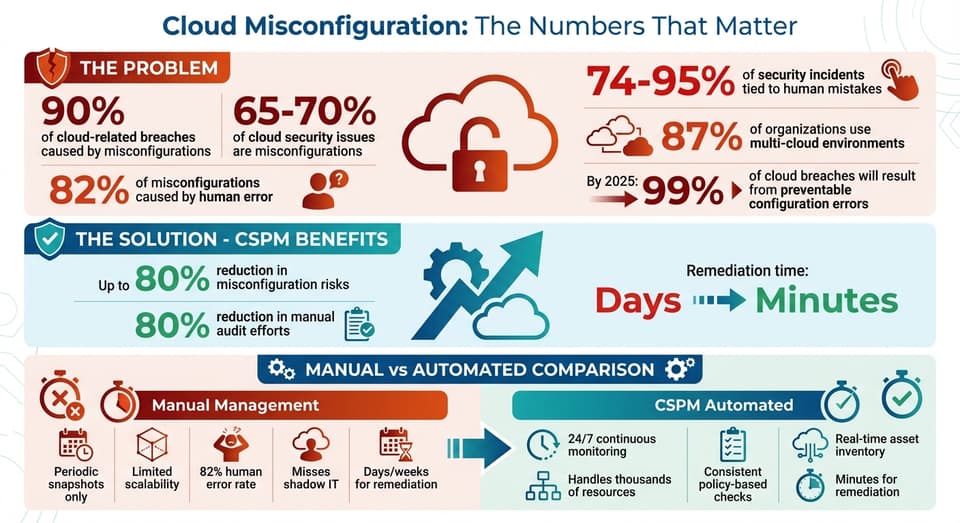
Cloud Misconfiguration Statistics and CSPM Impact
Why CSPM Tools Are Necessary for Detecting Cloud Misconfigurations
Problems with Manual Cloud Configuration Management
Managing cloud security manually just doesn’t cut it in today’s fast-paced environments. Enterprises often juggle thousands of resources, hundreds of IAM policies, and intricate network setups across platforms like AWS, Azure, and Google Cloud. Trying to track all of that manually? Simply impossible.
Add to that the rapid changes in cloud environments - containers and serverless functions that may only exist for minutes - and it’s clear why traditional snapshot audits fail. What might have worked in static data centers falls apart in these dynamic, ever-changing ecosystems.
Here’s a staggering stat: human error accounts for 82% of cloud misconfigurations. And it’s not just a small problem - between 74% and 95% of security incidents can be tied back to human mistakes. Manual processes often lead to “configuration drift,” where ad-hoc changes in the cloud console - sometimes nicknamed "ClickOps" - stray from secure baselines. These silent risks easily evade periodic reviews.
Visibility is another major issue. Teams often miss "shadow IT" - resources spun up by developers outside the watchful eye of IT. These rogue resources usually skip standard security protocols. The result? Chaos. One security team reported 847 "critical" alerts in a single day, only to find 782 were false alarms. This kind of alert fatigue makes it nearly impossible to manually sift through the noise, leaving actual threats buried.
How CSPM Tools Automate Misconfiguration Detection
This is where automated CSPM tools come in to save the day. These tools tackle the challenges of manual cloud management by providing continuous, automated monitoring around the clock. Instead of relying on outdated periodic snapshots, CSPM tools use API-driven or agentless scanning to deliver real-time visibility into cloud environments. They catch misconfigurations as they happen, not weeks later during an audit.
But these tools don’t stop at detection. They automatically compare your configurations against recognized benchmarks like CIS, SOC 2, and ISO 27001, flagging deviations immediately. And instead of bombarding teams with endless alerts, they use contextual risk prioritization to highlight real threats - like when a misconfigured firewall combines with an over-permissioned IAM role to create a genuine risk.
Automation also speeds up remediation. CSPM tools can fix common errors in minutes, which would otherwise take days or weeks with manual processes. For instance, they can instantly close an exposed port or revoke public access to a storage bucket using automated playbooks. Some even go a step further, scanning Infrastructure as Code (IaC) templates during development so teams can address issues before they ever hit production.
| Feature | Manual Configuration Management | CSPM Automated Detection |
|---|---|---|
| Frequency | Periodic snapshots | 24/7 continuous monitoring |
| Scalability | Limited; struggles in multi-cloud setups | Handles thousands of resources seamlessly |
| Accuracy | High chance of human error (82% of issues) | Consistent, policy-based checks |
| Visibility | Often misses "Shadow IT" | Real-time inventory of all assets |
| Remediation | Slow, manual ticketing (days/weeks) | Automated or guided fixes (minutes) |
sbb-itb-d663cbd
Automate Security for CSPM
Key Features of Automate Security
Automate Security introduces AI-powered CSPM capabilities tailored for DevOps teams and security leaders, designed to address cloud misconfigurations before they become issues. The platform integrates seamlessly with major cloud providers - AWS, Azure, and Google Cloud - using API-based, agentless onboarding. This means you can connect your cloud accounts in just minutes without the need to install any additional software.
One standout feature is its AI-driven prioritization, which maps misconfigurations against factors like exposure, identity access, and data sensitivity. This approach identifies actual attack paths, helping teams focus on the most critical risks. Additionally, its AI-SPM functionality provides in-depth visibility into AI infrastructure, covering everything from models to pipelines. With support for natural language queries, users can get immediate insights without needing technical expertise. These tools transform manual, time-consuming processes into more precise and efficient workflows, offering a smarter way to handle cloud security.
How Automate Security Improves Cloud Security Posture
With these advanced features, Automate Security goes beyond just identifying risks - it simplifies the remediation process, improving your overall cloud security posture. By continuously detecting and addressing vulnerabilities, the platform shifts security efforts from being reactive to proactive, tackling potential threats before they can be exploited. Its automated remediation capabilities also drastically reduce the time needed to resolve issues, ensuring faster and more effective protection.
Key Features of CSPM Tools
Required Features for Misconfiguration Detection
To make the most of automation, effective CSPM tools provide complete cloud visibility. This is achieved through an agentless, real-time inventory of all resources, such as virtual machines, containers, serverless functions, storage, and IAM roles. These tools can discover every asset in a multi-cloud environment without requiring extra software.
Another critical feature is continuous monitoring. This ensures 24/7 tracking of configuration drift, flagging any deviations from secure baselines like CIS or NIST. By adding contextual risk prioritization, the tools can pinpoint dangerous combinations, such as exposed networks, excessive permissions, and sensitive data vulnerabilities.
Look for platforms that offer step-by-step guidance or automated playbooks to quickly fix common issues. For instance, they can help revoke public access to storage buckets or close exposed ports, cutting remediation time from days to just minutes. Additionally, integrating Infrastructure as Code (IaC) scanning into CI/CD pipelines allows teams to detect misconfigurations in Terraform or CloudFormation templates before they reach production. This proactive "shift left" approach helps prevent problems early.
CSPM tools also map cloud configurations to regulatory frameworks like HIPAA, GDPR, PCI DSS, and SOC 2. This simplifies the creation of audit-ready compliance reports. With 87% of organizations now using multi-cloud environments, having a unified dashboard to enforce consistent security policies across platforms like AWS, Azure, GCP, and on-premises infrastructures is critical. Beyond these basics, AI takes CSPM to the next level.
Benefits of AI‑Powered Tools
AI turns CSPM tools into intelligent security partners. By correlating misconfigurations with other risk factors, AI-driven prioritization helps teams focus on genuine threats instead of being overwhelmed by generic alerts. This is especially important as experts predict that, by 2025, over 99% of cloud breaches will result from preventable configuration errors.
AI doesn't stop there. With graph-based algorithms, these tools can visualize attack paths, showing how attackers might exploit multiple misconfigurations to access sensitive data. Unlike static rules that only catch known issues, machine learning detects behavioral anomalies and runtime deviations from secure baselines. This makes it easier to identify zero-day attacks.
Research shows that CSPM tools can reduce misconfiguration risks by up to 80%. AI accelerates this process by providing actionable remediation steps - complete with specific code snippets or CLI commands - making protection faster and more effective.
Automate Security Plans Comparison
Plan Features and Pricing
Automate Security provides three CSPM tiers - Basic, Professional, and Enterprise - designed to address a variety of cloud security needs.
The Basic plan is tailored for small teams working in single-cloud environments. It focuses on core features like detecting misconfigurations and managing compliance, making it a practical choice for straightforward security requirements.
The Professional plan builds on the Basic tier by offering real-time monitoring and automated responses. It’s designed for mid-sized enterprises handling multi-cloud setups and looking to reduce reliance on manual remediation. This plan also integrates with DevOps tools like Jira and Slack, ensuring alignment with compliance standards such as SOC 2 and ISO 27001. Continuous monitoring becomes a key feature here, allowing organizations to stay on top of their security posture.
For Enterprise customers, the plan takes security to the next level with custom strategies and a focus on ongoing improvement. It includes all Professional features while adding unified governance for thousands of cloud accounts, AI-driven attack path analysis, and agentless scanning. These capabilities provide complete visibility without impacting system performance. Research highlights that CSPM can lower cloud-based security incidents from misconfigurations by as much as 80%, making this tier indispensable for large corporations with complex, regulated workloads. The Enterprise plan is ideal for global organizations that demand scalable, robust protection across multi-account environments.
| Feature | Basic | Professional | Enterprise |
|---|---|---|---|
| Best For | Small teams, single cloud | Mid-sized enterprises, multi-cloud | Global enterprises, high complexity |
| Threat Detection | Standard | Real-time monitoring | AI-powered with attack path analysis |
| Compliance Management | Basic frameworks | Broad frameworks with evidentiary support | Continuous compliance with custom rules |
| Remediation | Manual guidance | Automated workflows | Context-aware auto-remediation |
| Scalability | Limited environments | Medium-scale deployments | Unlimited cloud accounts |
To get started, inventory your cloud accounts and assign clear ownership. Focus on addressing misconfigurations with the most significant potential impact. If you’re new to automation, begin by testing auto-remediation on a few high-confidence controls, such as securing public storage buckets, in non-production environments. Once successful, expand these strategies to production workloads. These tiered plans allow organizations to grow their security measures as their needs evolve.
Best Practices for Implementing CSPM Tools
Assessing Your Cloud Environment
Before rolling out a CSPM tool, start by taking stock of your cloud assets. Use an agentless API to connect the tool to all your cloud accounts - whether on AWS, Azure, or GCP. This gives you a real-time inventory of your assets, including any shadow IT that may have bypassed formal approval processes.
Next, compare your configurations to established industry standards like CIS Benchmarks, NIST, or SOC 2. This will help you pinpoint deviations. Focus on prioritizing findings based on exposure, data sensitivity, and permissions. Interestingly, only about 1% of cloud misconfigurations actually lead to open attack paths. By zeroing in on these "toxic combinations", you can address real risks without getting bogged down by thousands of low-priority alerts.
After the assessment, set up continuous monitoring to catch configuration drift as it happens.
Setting Up Automation and Continuous Monitoring
Automation takes CSPM from being a one-off audit to a round-the-clock security solution. Configure your CSPM tool to flag any deviations from secure baselines in real time. Be sure to enable multi-region logging to cover all operational areas - attackers often exploit unmonitored regions to stay under the radar.
Begin with automated remediation for straightforward fixes, such as enabling encryption on storage buckets or blocking public access to newly created resources. Incorporate CSPM into your CI/CD pipelines to catch misconfigurations early. Tools like OPA or Cloud Custodian can enforce security guardrails consistently across multi-cloud setups. For better visibility, centralize logging by consolidating API audit logs, network flow logs, and configuration changes into a single dashboard. This makes cross-cloud correlation easier and more effective.
With this setup, your team is better equipped to respond to and remediate issues quickly and effectively.
Training Teams for CSPM Usage
Even with automation in place, your team plays a critical role in strengthening cloud security. A CSPM tool is only as effective as the people using it. Start by emphasizing the Shared Responsibility Model - your cloud provider secures the infrastructure, but securing configurations is on you.
Train DevOps teams to integrate security feedback directly into their workflows. For example, configure alerts to flag misconfigurations in pull requests during IaC scans. Leverage guided remediation instructions and AI-generated code from your CSPM tool to help teams learn how to fix recurring issues. Conduct quarterly audits to eliminate excessive privileges - over 90% of organizations grant more administrative access than necessary. Additionally, run tabletop exercises to simulate incidents like compromised IAM access keys. These exercises can help uncover visibility gaps and fine-tune incident response plans. Lastly, enforce tagging policies that require every resource to have an owner, environment, and data classification. This makes accountability clear and ensures smoother automation.
Conclusion
Key Takeaways
Cloud misconfigurations are responsible for over 90% of security incidents, making them a leading cause of data breaches. Using Cloud Security Posture Management (CSPM) tools can reduce these risks by up to 80%.
This highlights the growing importance of CSPM solutions. These tools go beyond just identifying issues - they provide a unified view across platforms like AWS, Azure, and GCP, which is crucial for the 87% of organizations operating in multi-cloud setups. They also automate continuous monitoring to detect configuration drift in real time, prioritize risks based on actual attack paths, and cut down manual audit efforts by as much as 80%. In today's cloud security landscape, CSPM is indispensable.
Automate Security offers AI-powered solutions designed to enhance your cloud security posture. Features like threat detection, compliance management, and automated incident response cater specifically to the needs of DevOps teams. By integrating CSPM into CI/CD pipelines and enabling automated remediation workflows, you can reduce your Mean Time to Remediate from days to minutes. The platform's focus on real-time defense and continuous improvement ensures your cloud infrastructure remains secure as it grows. Incorporating automated CSPM into your cloud governance strategy strengthens your ability to manage configurations, control access, and protect data.
What Is Cloud Security Posture Management (CSPM)? How to Secure Multicloud Environments
FAQs
What cloud misconfigurations should I fix first?
When it comes to securing your cloud environment, focus on tackling the most critical misconfigurations first. This includes addressing public S3 buckets, overly permissive IAM policies, and unencrypted databases, as these can lead to significant security risks. Network security is another priority - fix issues like open ports or insecure configurations without delay.
To stay ahead, consider leveraging CSPM tools and AI-powered solutions like Automate Security. These tools can help you continuously identify and resolve vulnerabilities, minimizing exposure and keeping your cloud environment protected.
How does CSPM catch configuration drift in real time?
CSPM keeps track of configuration drift in real time by constantly monitoring cloud environments. It uses a combination of advanced algorithms, machine learning, and runtime security tools to spot misconfigurations and anomalies as they occur. This approach allows for quick detection, response, and remediation.
How do I safely enable auto-remediation without breaking prod?
To implement auto-remediation securely, start by testing workflows in a controlled, non-production environment. This helps you confirm their effectiveness and avoid unintended consequences. Introduce changes gradually using phased rollouts, allowing you to monitor their impact step by step. For actions that carry higher risks, include manual approval steps to maintain oversight.
Make sure detailed logging and alerting systems are set up. These tools will help you track all activities, detect anomalies, and quickly reverse changes if something goes wrong. By combining gradual deployment, close monitoring, and robust oversight, you can reduce risks while keeping security intact.