
Container Security vs VM Security: Key Differences
Compare container and VM security: containers are lightweight and immutable but share the host kernel; VMs provide stronger isolation but need more...

When it comes to securing cloud infrastructure, containers and virtual machines (VMs) offer distinct advantages and challenges. Containers are lightweight, sharing the host OS kernel, while VMs operate with their own OS and kernel, isolated by a hypervisor. This fundamental difference shapes their security profiles, risk levels, and how vulnerabilities are managed. Here's a quick breakdown:
- Containers: Faster to deploy, resource-efficient, but share a single kernel, making them more vulnerable to kernel exploits and container escapes.
- VMs: Stronger isolation with separate kernels, ideal for sensitive workloads, but require more resources and are prone to configuration drift over time.
Key Takeaways:
- Containers excel in speed and scalability but need diligent host security and image management.
- VMs provide robust isolation, making them better for untrusted or sensitive workloads, though they demand more maintenance.
Quick Comparison:
| Feature | Containers | Virtual Machines (VMs) |
|---|---|---|
| Isolation | OS-level (shared kernel) | Hardware-level (separate kernel) |
| Security Risks | Kernel exploits, container escapes | Hypervisor attacks, OS sprawl |
| Resource Usage | Lightweight, efficient | Higher due to full OS stacks |
| Update Process | Rebuild and redeploy | In-place OS updates |
| Best For | Agile, microservices workloads | Sensitive, legacy applications |
Both technologies are often used together in hybrid environments to balance agility and security. Your choice depends on workload needs, isolation requirements, and operational priorities.
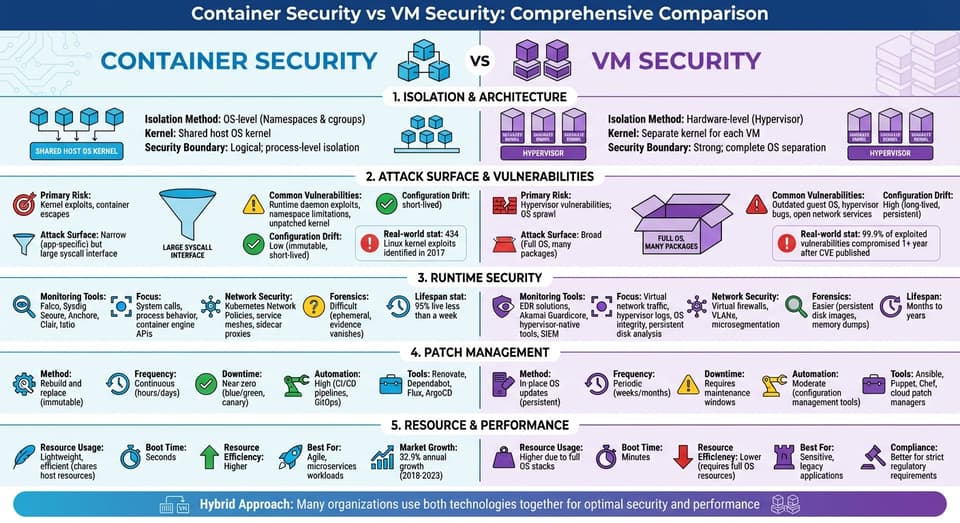
Container vs VM Security: Complete Comparison Chart
Container Security vs Virtual Machine Security
sbb-itb-d663cbd
How Containers and VMs Create Security Boundaries
The way containers and virtual machines (VMs) establish security boundaries directly impacts their risk profiles. Virtual machines achieve isolation at the hardware level using a hypervisor, which allows each instance to run its own complete operating system and kernel. In contrast, containers rely on the host kernel and isolate workloads through operating system-level mechanisms.
This distinction shapes their security strategies. As Intezer highlights, the hypervisor becomes a key target for attackers. On the other hand, containers face a different risk: the shared kernel. If compromised, this kernel could expose all containers running on the host.
How Containers Isolate Workloads
Containers focus on isolating workloads by virtualizing the operating system kernel instead of the hardware. This allows multiple workloads to operate on a single host OS while maintaining separation using Linux kernel features.
Key mechanisms include:
- Linux Namespaces: Isolate resources like process IDs, network stacks, and file systems.
- cgroups: Enforce resource limits for CPU, memory, and other system resources.
- Additional Tools: Seccomp, Linux Capabilities, and User Namespaces add further restrictions on container privileges.
Jim Reno, Chief Security Architect at Apcera, explains the value of these mechanisms:
"The separation provided by Linux namespaces and cgroups provides barriers that do not exist between plain processes".
However, these barriers are not foolproof. Ed Moyle from SecurityCurve emphasizes the role of administrators in maintaining security:
"The root user is still the root user, sensitive files are where they always are... it is up to the administrator to ensure the host running the container engine is secured".
While these isolation methods reduce risks, proper host configuration is critical to prevent container breakouts.
How VMs Isolate Workloads
VMs achieve isolation through the hypervisor, which allocates resources and ensures that each VM runs its own operating system and kernel. This design minimizes the risk of cross-instance attacks.
Because each VM operates with its own kernel, vulnerabilities in one VM's OS are isolated and cannot directly impact other VMs or the host system. This reduces the likelihood of kernel-level exploits compared to containers.
This robust isolation makes VMs ideal for multi-tenant environments or scenarios requiring the hosting of untrusted code. However, this comes at a cost. VMs require dedicated memory and CPU resources for each full operating system stack, which can lead to higher storage demands and slower boot times.
That said, VMs are not without risks. Each VM introduces an OS-level attack surface, including open ports, installed software, and dependencies. Moreover, the hypervisor itself is a high-value target. Research indicates that 99.9% of exploited vulnerabilities are compromised more than a year after the CVE was published.
Comparison Table: Isolation Methods and Security Boundaries
| Feature | Virtual Machines (VMs) | Containers |
|---|---|---|
| Isolation Method | Hardware-level (Hypervisor) | OS-level (Namespaces & cgroups) |
| Kernel | Separate kernel for each VM | Shared host OS kernel |
| Security Boundary | Strong; complete OS separation | Logical; process-level isolation |
| Primary Mechanisms | Hypervisor enforcement | Namespaces, cgroups, Seccomp, Capabilities |
| Primary Risk | Hypervisor vulnerabilities; OS sprawl | Kernel exploits; container escapes |
| Resource Control | Fixed allocation via hypervisor | Resource limiting via cgroups |
| Attack Surface | Broad (Full OS, many packages) | Narrow (App-specific) but large syscall interface |
| Risk Profile | Lower risk for multi-tenancy | Higher risk of container breakout to host |
| Boot Time | Minutes | Seconds |
| Resource Efficiency | Lower (requires full OS resources) | Higher (shares host resources) |
Attack Surfaces and Common Vulnerabilities
The way containers and virtual machines (VMs) are built creates distinct security risks. Containers rely on a shared kernel with a broad system call interface, while VMs depend on a hypervisor with a smaller, more restricted interface. These architectural differences shape the vulnerabilities each technology faces. Here's a closer look at the common risks for both containers and VMs.
Common Container Vulnerabilities
Containers share a single kernel, which means a vulnerability in that kernel can potentially allow attackers to break out, compromising the host and all running containers. This shared process-to-kernel interface creates a large, shared attack surface.
Another key risk comes from the container runtime. For instance, the Docker daemon runs as root, so if it’s compromised, attackers gain full control of the host system. A real-world example of this is the Doki malware discovered in July 2020. This malware exploited misconfigured and publicly exposed Docker APIs to escape containers, take over the host, and spread to other containers.
Image security is another major concern. Many containers rely on base images pulled from public repositories like Docker Hub. If these images aren’t from trusted and signed providers, they could contain vulnerabilities or even malicious code. Additionally, some Linux system components are not fully isolated by namespaces. For example, before the release of Linux 5.6 in March 2020, containers with elevated privileges could change the system time for the entire host and all other containers.
Common VM Vulnerabilities
VMs face different challenges, primarily due to their reliance on both a hypervisor and full operating systems. The hypervisor itself is a critical security component. As Intezer explains:
The hypervisor acts as the metaphorical 'keys to the kingdom,' providing a high-value target for threat actors. If it is compromised, it puts every workload and datastore on the physical server at risk.
One notable example occurred in February 2021 when a ransomware attack exploited VMware ESXi (CVE-2021-21974). This attack highlighted how even though hypervisors provide strong isolation, they remain attractive targets for attackers. A compromised hypervisor can expose all hosted VMs.
Each VM runs a complete operating system, which increases its attack surface through open network ports, running services, and installed dependencies. Long-lived VMs are especially prone to configuration drift, where outdated software, unpatched vulnerabilities, and unnecessary files accumulate over time, making them easier targets for attackers.
Comparison Table: Attack Surfaces and Vulnerabilities
| Feature | Containers | Virtual Machines |
|---|---|---|
| Primary Attack Surface | Shared kernel, container runtime, system call interface | Hypervisor, full guest OS stack, virtualized hardware |
| Isolation Weakness | Kernel exploits, container escapes | Hypervisor escapes |
| Image/Template Risk | High (untrusted public images) | Lower (managed OS templates) |
| Configuration Drift | Low (immutable, short-lived) | High (long-lived, persistent) |
| Common Vulnerabilities | Runtime daemon exploits, namespace limitations, unpatched kernel | Outdated guest OS, hypervisor bugs, open network services |
| Mitigation Difficulty | Moderate (requires specialized tools) | High (requires managing full OS fleets) |
Runtime Security and Monitoring Approaches
Containers and virtual machines (VMs) require tailored security strategies during runtime. Containers benefit from real-time system call monitoring to address their fleeting lifespans, while VMs rely on hypervisor-level oversight to manage long-term security risks like configuration drift.
The short-lived nature of containers poses challenges for forensic analysis. As Jim Reno, Chief Security Architect at Apcera, puts it:
Short container lifetime means that if an attacker does get in, the time he has to do something is limited... The downside is that forensics are harder. Once the container is gone, it cannot be probed.
To counter this, container security emphasizes streaming logs and events to centralized storage before the container terminates. On the other hand, VM security can lean on traditional endpoint detection and response (EDR) tools, which analyze persistent disk images and long-running processes.
Automation plays a key role in both environments. For containers, integrating vulnerability scanners like Trivy, Anchore, or Clair into CI/CD pipelines ensures only secure, signed images reach production. For VMs, automation helps maintain secure configurations by continuously validating systems against their intended state, preventing unauthorized changes over time.
Container Runtime Security Practices
The foundation of container runtime security lies in monitoring system calls for unusual behavior. Tools like Falco and Sysdig Secure flag suspicious activities, such as unexpected file access, privilege escalations, or unusual network connections. These tools operate at the kernel level, tracking every interaction between containerized processes and the shared host kernel.
Given that containers share the host kernel, hardening the host is crucial. This includes removing unnecessary Linux kernel capabilities, restricting system calls with seccomp profiles, and running containers with minimal privileges. User namespaces further enhance security by mapping a container's root user to a non-privileged UID on the host, reducing the risk of container breakouts - even if an attacker gains root access within the container.
For network security, micro-segmentation is a key strategy. Kubernetes Network Policies and service meshes like Istio use tools such as Envoy sidecar proxies to enforce strict "allow-only" traffic rules between containers. This ensures that inter-container communication is tightly controlled, limiting potential attack vectors.
To ensure only trusted code runs in production, Docker Content Trust verifies image signatures. Combined with automated scanning in CI/CD pipelines, this approach shifts security earlier in the development cycle, catching vulnerabilities before deployment rather than during runtime.
VM Runtime Security Practices
VM runtime security begins with hardening the hypervisor, which serves as the foundation for all VMs on a physical server. Since compromising the hypervisor can allow attackers to move laterally across workloads, it's critical to keep it patched and restrict access.
Network segmentation is another vital layer of defense. Virtual firewalls and VLANs limit lateral movement between VMs. Tools like Akamai Guardicore enhance visibility and micro-segmentation, monitoring network traffic patterns and automatically blocking suspicious connections.
Traditional EDR tools remain essential for VMs, monitoring process behavior, file changes, and network activity. These tools also enable forensic analysis by inspecting persistent disk images and memory dumps - tasks that are simpler with VMs due to their long-lived nature. Centralized SIEM (Security Information and Event Management) systems aggregate logs from hypervisors, guest operating systems, and virtual network devices, providing a comprehensive view of VM environments.
Snapshot management is another key practice. Snapshots preserve a known-good state before major changes, allowing for quick rollbacks if issues arise. However, snapshots must be stored securely, as they often contain sensitive data. Over time, managing configuration drift becomes a challenge for VMs, as accumulated updates, user accounts, and configuration changes can introduce vulnerabilities.
Comparison Table: Runtime Security Practices
| Feature | Containers | Virtual Machines |
|---|---|---|
| Primary Monitoring Tools | Falco, Sysdig Secure, Anchore, Clair, Istio | EDR solutions, Akamai Guardicore, hypervisor-native tools, SIEM |
| Monitoring Focus | System calls, process behavior, container engine APIs | Virtual network traffic, hypervisor logs, OS integrity, persistent disk analysis |
| Network Security | Kubernetes Network Policies, service meshes, sidecar proxies | Virtual firewalls, VLANs, microsegmentation |
| Forensics Capability | Difficult (ephemeral, evidence vanishes) | Easier (persistent disk images, memory dumps) |
| Automation Priority | CI/CD pipeline scanning, immutable deployments | Configuration drift prevention, patch management |
| Update Method | Destroy and redeploy from patched images | Apply in-place patches or use snapshot rollbacks |
Patch Management and Update Processes
The way containers and virtual machines (VMs) handle updates is fundamentally different. Containers rely on immutable infrastructure principles, meaning they are rebuilt and replaced rather than updated in place. VMs, on the other hand, are persistent and require direct updates to their operating systems, which are stored locally and remain intact across reboots.
Maya Kaczorowski, Product Manager for Container Security at Google Cloud, puts it succinctly:
With containers, you don't patch live containers, you patch the images in your container registry.
For containers, patching involves updating the base image in the Dockerfile and redeploying the updated container. VMs, however, typically require manual operating system updates via SSH or configuration management tools, which may involve planned downtime. Tools like Kubernetes simplify container patching through passive patching - when a container stops or scales, the system automatically launches a new instance with the latest patched image.
To illustrate the efficiency of containers, consider how Google addressed the Heartbleed and Spectre/Meltdown vulnerabilities in 2014 and 2018. Using blue/green deployment strategies in their containerized environment, they patched their entire infrastructure without any downtime. By contrast, VMs often rely on traditional cycles like "Patch Tuesday."
Another challenge with VMs is configuration drift. Over time, manual adjustments lead to inconsistencies between production and development environments. Containers avoid this issue because they are short-lived - 95% of containers live less than a week - and always revert to their original image state upon redeployment.
How Containers Handle Updates
Container updates are closely tied to CI/CD pipelines, enabling frequent deployments, sometimes even on an hourly basis. The process is straightforward: identify a vulnerability, update the base image, rebuild the container, and redeploy. Tools like Renovate and Dependabot can automate the detection of outdated base images and trigger updates.
However, delays can arise from dependency management. For example, teams often depend on upstream providers like Debian or Python to release patched base images. While some vulnerabilities are addressed in days, others may take up to 30 days, leaving little time for testing.
To mitigate delays, teams can use multi-stage Docker builds. Including a RUN apt-get update && apt-get upgrade step in the build process ensures the latest patches are applied, even if the upstream image is slightly outdated. Reducing the number of packages in a base image by using minimal or "distroless" variants can also shrink the attack surface by up to 95%.
For consistency, use immutable digests (e.g., image@sha256:...) instead of mutable tags like latest. Admission controllers can enforce policies to allow only signed and freshly scanned images into production. While temporary runtime patches can address critical vulnerabilities, a formal image rebuild should follow within 24 hours to maintain immutability.
How VMs Handle Patches
VM patching follows a more traditional approach. Updates are applied directly to the operating system using tools like yum update or apt-get upgrade, often requiring reboots or scheduled maintenance. Configuration management tools like Ansible, Puppet, or Chef can help automate this process, but VMs remain prone to configuration drift.
As Jianing Guo, Product Manager at Google Cloud, explains:
The VM is an opaque application packaging format, and it's hard to establish a streamlined workflow to examine and catalog its content prior to deployment.
VMs are typically long-lived, running for months or even years. This persistence can be both a strength and a weakness. On the one hand, patches remain on disk for forensic analysis after an incident. On the other hand, this persistence increases the risk of vulnerabilities. For instance, under CISA's Operational Directive, known vulnerabilities must be remediated within two weeks, a timeline that can be challenging for VMs.
Cloud providers now offer automated OS patching services to reduce manual effort, but careful scheduling is still necessary to minimize disruptions during updates.
Comparison Table: Patch Management Approaches
| Feature | Containers | Virtual Machines |
|---|---|---|
| Patching Method | Rebuild and replace (immutable) | In-place OS updates (persistent) |
| Update Frequency | Continuous (hours/days) | Periodic (weeks/months) |
| Typical Lifespan | Minutes to days | Months to years |
| Downtime | Near-zero (blue/green, canary) | Requires maintenance windows |
| Configuration Drift | Minimal (reset on restart) | High (accumulates over time) |
| Automation | High (CI/CD pipelines, GitOps) | Moderate (configuration management tools) |
| Dependency | Upstream base image providers | Centralized OS update services |
| Tools | Renovate, Dependabot, Flux, ArgoCD | Ansible, Puppet, Chef, cloud patch managers |
When to Use Containers vs VMs for Security
Deciding between containers and virtual machines (VMs) boils down to understanding your specific security needs. This choice builds on earlier discussions about isolation and runtime practices, tying them directly to how you deploy and manage workloads.
The decision primarily revolves around three key factors: isolation depth, application architecture, and operational tempo. VMs provide robust security boundaries, making them ideal for untrusted code or workloads with varying levels of trust. On the other hand, containers thrive in environments that demand rapid deployment and scaling.
When Containers Are the Better Choice
Containers shine in scenarios where speed and immutability are critical for security. They are particularly well-suited for microservices and applications that require constant updates. For instance, the container market was predicted to grow at an annual rate of 32.9% from 2018 to 2023, reflecting their increasing adoption.
One of the major security advantages of containers is their short lifespan - often just hours or days. This minimizes attack opportunities and helps avoid configuration drift. Notably, 99.9% of exploited vulnerabilities occur more than a year after a CVE is disclosed, and containers’ ephemeral nature helps mitigate this risk.
Another benefit is the way containers are managed. Instead of patching them in place, containers are rebuilt and redeployed, ensuring that production environments mirror the tested development setup. Tools like Dockerfiles and YAML manifests provide a detailed inventory of components, making vulnerability scanning and security audits more straightforward.
When VMs Are the Better Choice
VMs are the go-to option when strong isolation is a top priority or when legacy systems are involved. They are particularly critical for workloads handling sensitive data - such as healthcare or financial information - where compliance and strict security boundaries are essential. This aligns with strategies designed to address hypervisor-level risks. For example, in 2017, 434 Linux kernel exploits were identified, any of which could lead to a container breakout due to their shared kernel design.
Additionally, legacy or monolithic applications that require full control over an operating system often perform better in a VM environment.
Decision Factors for Security Teams
When choosing between containers and VMs, security teams should weigh three practical considerations. These factors align with earlier discussions on managing vulnerabilities and patching, ensuring a unified security strategy:
- Attack Surface Tolerance: If a single kernel flaw could compromise your workload, VMs are the safer choice. However, containers are better suited for scenarios where rapid patching can address shared kernel risks.
- Operational Tempo: Applications that need frequent updates - sometimes multiple times a week - benefit from container-based CI/CD pipelines. Conversely, systems with infrequent changes may leverage the stability of VMs.
- Governance Requirements: Containers simplify audits through clear build artifacts, while VMs offer more granular control at the OS level.
These considerations highlight the growing popularity of hybrid approaches, where organizations combine the strengths of both technologies. For example, containers can run inside VMs (e.g., using AWS Fargate), or platforms like KubeVirt can manage containers and VMs side by side. This hybrid strategy merges the efficiency of containers with the robust security boundaries of virtualization, offering flexibility to meet both operational and compliance demands.
Conclusion
Deciding between container and VM security comes down to understanding what each technology brings to the table and aligning it with your specific requirements. The main difference lies in how they handle isolation and operations: VMs use hypervisors to achieve hardware-level isolation, making them great for multi-tenant setups or environments with strict security needs. Containers, on the other hand, rely on Linux namespaces and cgroups for process-level isolation, offering a lightweight, fast deployment option.
This distinction explains why many modern infrastructures use a mix of both. Containers are perfect for agile microservices that need frequent updates, while VMs are better suited for legacy systems or stateful services like databases. Combining the two allows organizations to balance flexibility with strong isolation, which directly affects runtime security and update workflows.
Your security strategy should match your infrastructure's demands. For workloads involving untrusted code or sensitive data, VMs offer more robust protection. Meanwhile, containers are ideal for internal microservices that operate within fast-paced CI/CD pipelines, reducing the risk of configuration drift.
Both technologies require tailored security measures. Containers benefit from practices like automated image scanning and securing the host operating system, while VMs rely on regular patching and monitoring to maintain their defenses. Ultimately, your choice should reflect your operational pace, compliance needs, and the level of isolation your workloads require.
FAQs
Are containers or VMs safer by default?
Containers, by design, are often seen as less secure than virtual machines (VMs). This comes down to how they operate: containers rely on OS-level virtualization, which means they share the same kernel. This shared kernel can increase the risk of attacks if not configured correctly. VMs, however, run separate kernels for each instance, creating stronger isolation and minimizing potential vulnerabilities. In the end, the security of containers largely hinges on sticking to best practices, while VMs offer a more secure baseline due to their architectural setup.
How do I prevent container escapes in production?
To keep containers secure in production, it's crucial to follow a few important steps. First, disable privileged containers and avoid sharing host namespaces to limit potential attack vectors. Use tools like Seccomp and Linux capabilities to control what containers are allowed to do.
Make sure to regularly update container images and apply security patches to address vulnerabilities. Keeping an eye on runtime activity for anything unusual can help catch potential threats early.
Additionally, stick to best practices: remove unnecessary capabilities, steer clear of running containers as root, and opt for minimal base images. These steps can significantly shrink the attack surface and strengthen your container's overall security.
When should I run containers inside VMs?
Running containers within virtual machines (VMs) works particularly well in industries like finance or healthcare, where security is a top priority. This approach provides an added layer of isolation, helping organizations comply with stringent regulations. By merging the efficiency of containers with the strong isolation offered by VMs, this setup is ideal for handling sensitive workloads that require extra protection.